
Choose one customer question and one campaign goal
You have six creator videos in a folder. One looks polished, two make different claims, and nobody knows which files can run as ads. The campaign has produced content, but it has not produced a usable answer.
A practical UGC marketing campaign starts with a question a buyer needs resolved. For a folding phone stand, that might be: “Can I follow a recipe without holding my phone?” Your job is to collect a credible demonstration, secure the intended usage, and measure the response against an existing alternative.
Choose one goal for the first round: improve the explanation on a product page, acquire usable creative, or test paid-ad performance. Each needs different evidence. This tutorial follows a paid creative test, with a complete hypothetical brief and numbers you can recalculate.
Gather the product facts, people, and permissions
“User-generated ads” and “user-generated content ads” describe how creator or customer material is used in advertising. They do not tell you whether the person bought the product independently, received a gift, or was paid to make the video. Record that relationship before editing. The UGC meaning guide explains the labels.
Build a one-page product fact sheet. Include the SKU, dimensions, compatible uses, setup instructions, and claims you can substantiate. Attach the relevant product evidence. Put uncertain claims in a separate “do not use” list so the creator can work without guessing.
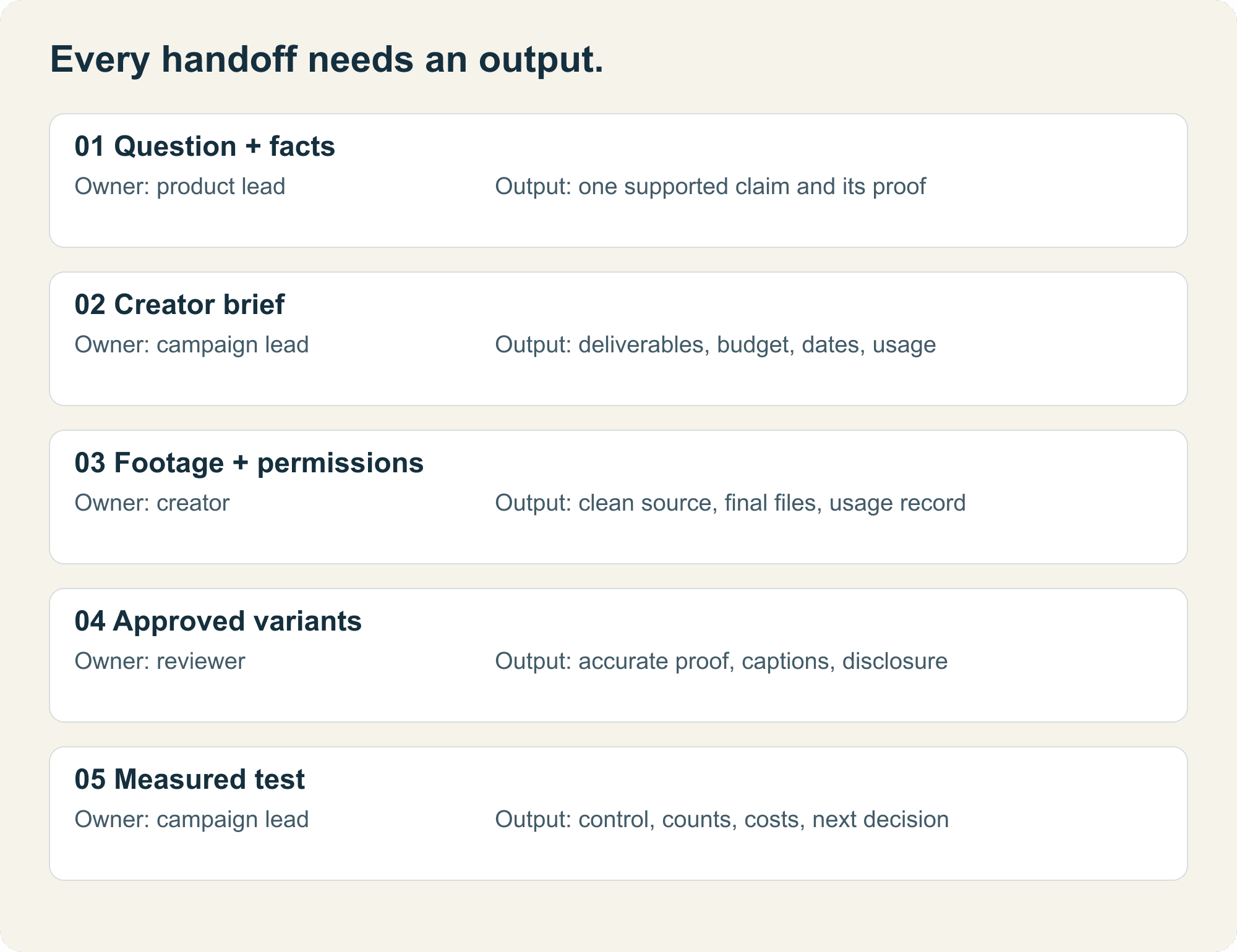
Then assign three responsibilities, even if one person handles all of them:
| Owner | Must supply | Handoff condition |
|---|---|---|
| Product owner | Accurate facts and physical sample | Creator can demonstrate the actual use |
| Creator or editor | Footage, captions, and agreed variations | Files match the brief and show the required action |
| Campaign owner | Usage record, landing page, measurement plan | Approved files and tracking are ready together |
Before commissioning, agree on deliverables, payment, revision rounds, permitted edits, channels, territory, and usage dates. Record organic posting and paid advertising separately. Ask about music and other third-party material included in the file.
For U.S. endorsements, the FTC says material relationships can require disclosure, including payment or free products. Build that disclosure into the creative review. A platform label alone does not automatically resolve every disclosure issue. FTC endorsement guidance.
Take the campaign from brief to approved files
Step 1: Ask for observable behavior
Write “Show the phone resting on the stand while a recipe is visible.” Avoid asking for an unsupported personal claim such as “Tell viewers this changed your cooking.” A creator who genuinely uses the product can describe that experience accurately; an actor should not be assigned a customer history.
Step 2: Approve the idea before the full shoot
Ask for a short outline or rough take showing the setup and proof shot. Check the product position, claim, and disclosure. This review should catch a wrong use before it becomes six edited files.
Approve the facts and required action while allowing the creator to use natural phrasing. Over-scripting every sentence can make a simple demonstration hard to deliver.
Step 3: Request an editable handoff
Collect the final export, clean footage, caption text, and any separately agreed audio. Use an asset ID such as stand_creatorA_demo_v01. Store the creator, source filename, approval date, and usage end date beside it.
Check that someone can find the original supporting shot from the final export. This matters when a caption changes or a platform crop hides part of the demonstration.
Step 4: Make two controlled variants
For the first comparison, keep the demonstration, offer, destination page, and CTA the same. Change the opening question. Save each version under a different asset ID and note the variable.
If you also change the creator, pacing, product angle, and offer, you can still compare the finished creatives. You will have less evidence about which ingredient caused any difference.
Step 5: Clear the distribution method
TikTok UGC ads can use a creator's existing post through Spark Ads when authorization is provided. TikTok's documentation distinguishes your own posts from other creators' authorized posts. Confirm the authorization duration alongside the agreed paid usage period. TikTok Spark Ads documentation.
A platform authorization and a commercial usage agreement answer different operational questions. Keep both records with the asset. Recheck the account's current eligibility and setup before scheduling the test.
Use this completed brief for a first TikTok UGC ads test
Illustrative campaign: The stand, prices, fees, and performance figures below are planning assumptions. They are not a ReelFlock customer campaign or market-rate estimates.
| Brief field | Completed example |
|---|---|
| Product | One folding phone stand; use the supplied physical sample |
| Buyer question | Can I follow a recipe while keeping both hands free? |
| Desired action | Visit the page and check phone compatibility |
| Deliverables | One core demonstration, two opening variants, clean footage, caption text |
| Required proof | Show the stand opening, the phone resting on its ledge, and the recipe readable from the working position |
| Opening A | “Where does your phone go while you cook?” |
| Opening B | “Here is one way to keep a recipe in view.” |
| Shared body | Open the stand, place the phone, show the viewing position |
| Shared ending | “Check the dimensions against your phone and case.” |
| Excluded claims | Universal compatibility, heat resistance, waterproofing, and invented personal results |
| Review | Product owner checks facts; campaign owner checks permissions, disclosure, captions, and tracking |
| Usage proposal | U.S. TikTok paid placement for 30 days; agree actual terms before work starts |
Allocate a hypothetical $300 creator fee, $30 sample and shipping, $120 editing, and $600 media test. Total initial cash budget: $1,050. Staff time and taxes are additional; log them separately. The proposed fee covers this example only and requires agreement with the creator.
Use the existing approved creative as the control. Reserve $300 of media for it and $300 for the new creative. Test one new variant first if the budget cannot support three useful samples. Keep the second opening for a subsequent round.
Allow seven days for delivery after the creator receives the sample, two days for review, and a seven-day measurement window. Start the measurement clock only when both approved creatives are actually running. Download the editable campaign brief and replace the assumptions before commissioning work.
Compare against a control without hiding the costs
Use a platform-supported randomized split when available. Otherwise, label the result an observational comparison: delivery systems, audiences, and timing can differ. Keep the offer and destination stable, and use the same attribution setting for both cells. For this example, the reporting definition is purchases attributed within seven days after a click, with view-through conversions excluded.
These invented results demonstrate the calculation:
| Metric | Existing creative | New creator demonstration |
|---|---|---|
| Media spend | $300 | $300 |
| Impressions | 20,000 | 18,000 |
| Link clicks | 200 | 270 |
| Attributed purchases | 8 | 9 |
| Click-through rate: clicks ÷ impressions | 1.00% | 1.50% |
| Purchases ÷ link clicks | 4.00% | 3.33% |
| Media cost per attributed purchase | $37.50 | $33.33 |
The new creative has a higher click-through rate and a lower purchase rate per click in this example. Nine purchases versus eight gives weak evidence for a durable sales advantage. The numbers are compatible with several explanations, including different click quality and random variation.
Production changes the economics too. Assigning the full $450 production expense to the first nine attributed purchases gives ($300 + $450) ÷ 9 = $83.33 per purchase for that new asset. The control's historical production cost is not included in the media-only comparison. State that asymmetry instead of calling the new creative profitable.
A $35 order with $18 contribution before acquisition cannot support a $33.33 media acquisition cost on the first order. Both figures here are hypothetical. Use your own contribution after product cost, fulfillment, discounts, fees, and expected returns before deciding a ceiling.
What to do when the campaign stalls
The clip looks convincing but cannot support its claim. Narrow the wording or request a real proof shot. Another transition will not fix missing evidence.
The file has no paid usage permission. Keep it out of the ad queue until the permission record is complete. Do not treat a social mention as a completed advertising handoff.
Clicks rise but purchases do not. Check destination load, stock, compatibility information, and offer consistency. Read buyer questions before asking for a more dramatic opening.
There are too few purchases. Report the observed counts and costs without declaring a winner. Continue only within the preset budget and quality limits. Stop immediately for an inaccurate claim, broken destination, expired authorization, or exhausted spend cap.
Close the round with one decision: keep the current creative, revise a specific section, or run another comparison. Save the reason beside the asset so the next campaign starts with something more useful than “make more UGC.”