
What makes a call to action clear and useful?
Your product video shows a jacket, but its closing instruction sends shoppers to a homepage full of unrelated items. The CTA creates another search task. To write a useful call to action for an online store, choose the next action the shopper is ready to take, name it with a concrete verb, and explain what they will receive. Then check that the destination fulfills the promise. Put any important cost, commitment, or condition close to the action.
A working formula is action + useful object or outcome: “Compare the two sizes,” “Download the measurement sheet,” or “Choose your color.” The best choice depends on the person’s current task, not on which verb sounds most forceful.
Compare these original teaching examples:
| Vague or mismatched CTA | More useful version | Destination required |
|---|---|---|
| Click here | View the garment measurements | The correct measurement table |
| Get started | Choose your size | The featured garment with its size selector |
| Discover more | Compare the two tray sizes | A genuine comparison view |
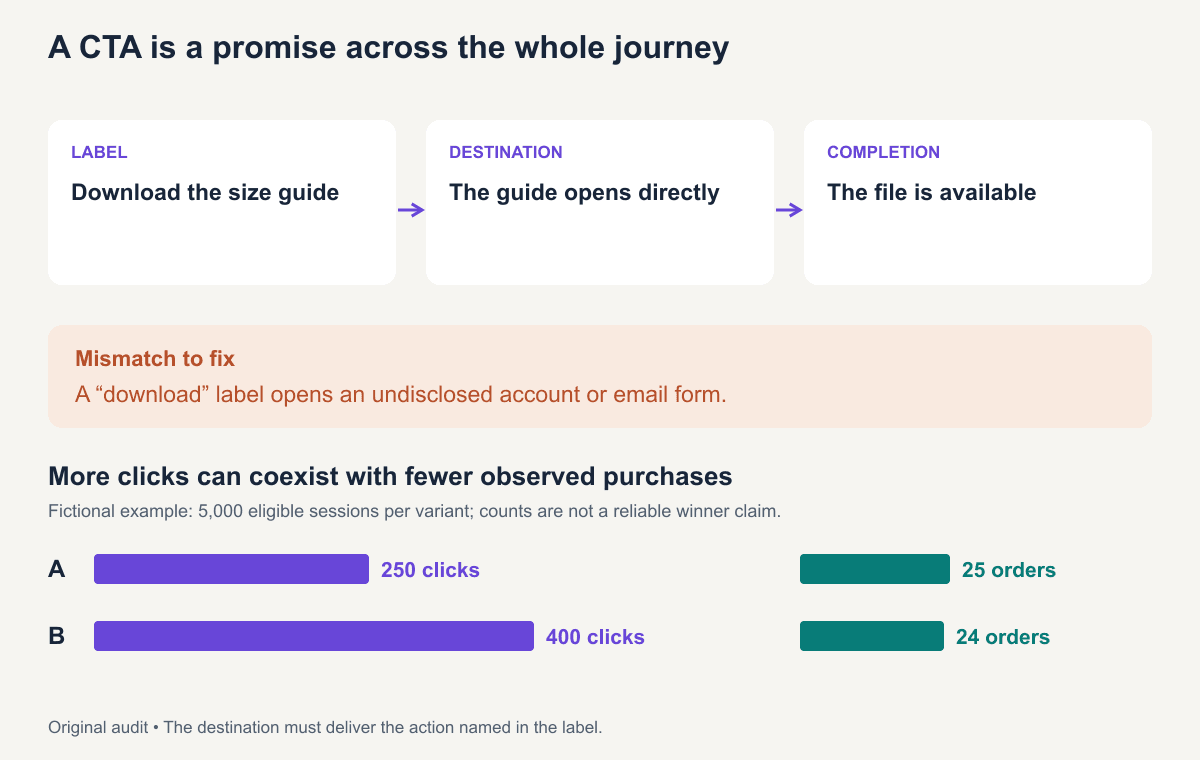
| Claim your free guide | Download the sizing guide (PDF) | The guide; disclose an email requirement if one exists |
Descriptive link language also supports accessibility. W3C’s guidance on link purpose explains that people should be able to determine what a link does from its text or associated context. Clear CTA copy helps users decide before they activate it.
Step 1: Choose one primary action
Write the user’s immediate decision before drafting the button. A first-time visitor may need to inspect fit; a returning buyer may be ready to choose a size. Do not treat both people as if they require the same instruction.
For a fictional clothing page, the primary action could be selecting a size before adding the garment to a bag. The size guide supports that decision. In a restock email, the action might be returning to the exact garment and selecting an available size.
Make a destination map:
Current question: Will this overshirt fit over my tee?
Next useful action: Compare garment measurements.
CTA: View chest and shoulder measurements.
Destination: The selected overshirt's measurement table.
Completion: The person can inspect the table and return to size selection.
If the table is missing, fix the destination before polishing the wording. Copy cannot deliver information that the page does not contain.
Step 2: Write the action and the reason to take it
Use a concrete object with the verb. “Get” by itself is vague; “Get a restock alert for size M” tells shoppers what to expect. Keep the most important action readable without a long surrounding paragraph.
The reason can live in nearby text when the button would become unwieldy:
Compare chest, shoulder, and length measurements with a layer you own.
View the overshirt size table
That arrangement keeps the button concise while explaining the decision it supports. Do not promise a personalized recommendation if the destination is merely a generic table.
Draft three options with different levels of commitment. For a product demonstration, they might be “Watch the divider change,” “Compare the layouts,” and “Choose your tray.” Choose the one that matches the current page and available destination. These are different actions, so test them as different journeys rather than pretending only the wording changed.
Step 3: Remove uncertainty about what happens next
Open the destination yourself and follow the complete shopper journey. Check the selected variant, stock state, shipping information, any form requirements, and the confirmation. Put consequential requirements close to the action.
A restock alert should identify the item and variant being watched. A bundle CTA should lead to the pictured bundle with its contents clear. If a genuine promotion has a deadline, give the date and applicable terms. Update the ad when the offer ends.
For a signup, explain whether the shopper will receive only the requested alert or additional marketing according to the actual flow. For a pre-order, state that status and the current dispatch expectation. The CTA and its support text should describe what your store actually does.
Call-to-action examples by channel
All examples here are original teaching copy. Use them only with destinations and conditions that match.
Product pages and landing pages
| Situation | CTA | Nearby explanation |
|---|---|---|
| A shopper needs fit information | View garment measurements | Measurements are for the selected style; compare using the shown method. |
| A shopper has selected a variant | Add this size to bag | Show selected size, color, price, and availability. |
| Two models solve different tasks | Compare the two models | Show the attributes that change the decision. |
Keep secondary help available without making every action equally prominent. Someone who needs a size guide should be able to find it without losing their selection.
Product emails and restock messages
| Email promise | CTA | Destination check |
|---|---|---|
| A specific size is back | Check size M availability | The same garment, color, and size; current stock |
| A new collection is available | View the new overshirts | The named collection rather than the store homepage |
| A saved basket is still available | Return to your basket | The actual saved items, with current price and stock |
| A product needs selection guidance | Compare the two sizes | The relevant size comparison |
Write the email and the destination together. “Back in stock” is a time-sensitive claim; recheck availability before sending or using it in ongoing creative.
Social posts and short-form videos
Choose the action available in that actual placement. “Open the linked size guide” works only when there is an accessible link to that guide. A video on one platform may need different closing language from the same footage on another.
For an educational styling clip, “Save this outfit checklist” can be a relevant action. For a shopping clip, directing people to the pictured garment’s page may be more appropriate. Do not ask for saving, sharing, following, commenting, and buying in the same closing breath.
Restock forms and product alerts
For an unavailable variant, “Notify me when size M returns” describes the task more precisely than “Join us.” Show the product, color, and size near the form, explain what contact information is required, and confirm the requested alert after submission.
For a product launch waitlist, explain what joining provides and whether it creates any purchase commitment. Keep the next step small enough for the shopper's current intent and specific enough that they can recognize completion.
How to place a CTA in a short video
Align three layers: what the presenter says, what the screen says, and what the viewer can actually open. Treat the closing frame as a small piece of instruction design.
For a fictional overshirt video:
| Layer | Proposed content | Check |
|---|---|---|
| Spoken | “Compare the chest and shoulder measurements before choosing your size.” | The table contains those fields |
| On-screen | View the overshirt size table | Readable in the actual platform preview |
| Destination | The same overshirt product page with accessible measurements | No unrelated category page |
| Closing shot | The garment and its selected color | Matches the linked item |
Hold the closing frame long enough for a real viewer to understand it. There is no universal duration that guarantees comprehension. Preview on a phone, listen once, and check the destination from the actual placement.
For the complete sequence before this ending, see the marketing video script examples.
With the destination checked, build the surrounding product-video script in ReelFlock. Include your chosen CTA in the brief so the opening and demonstration lead toward the same action.
Troubleshoot a CTA that gets attention but stalls
| What you observe | First thing to inspect | Next edit or check |
|---|---|---|
| Viewers ask where to buy | Whether the available link reaches the featured SKU | Align the spoken action, link, and product page |
| Shoppers open the guide but still ask about fit | Missing measurements or an unclear method | Repair the guide before changing the button |
| Clicks lead to an unavailable variant | Stock state and variant selection | Update the destination or offer a clearly labeled alert |
| Shoppers abandon a promised download | Undisclosed form or confusing confirmation | State the requirement and verify completion |
Use these as investigation paths. Each pattern can have several causes, so inspect the actual journey before assigning the problem to a word or button color.
How to test a CTA
Start with a question you can isolate: “Does specifying the object improve completed guide downloads?” Keep the offer, destination, placement, and audience assignment consistent when testing wording alone.
Decide the primary outcome before running the test. A completed size-guide view, requested restock alert, or purchase may be the objective; clicks are an earlier step. Set the observation period, assignment unit, attribution window, and sample-size plan. Avoid repeatedly stopping as soon as one variant looks ahead.
This fictional dataset illustrates why denominators matter. It is not an actual experiment or a benchmark:
| Variant | Assigned eligible sessions | CTA clicks | Purchases | Clicks / sessions | Purchases / clicks | Purchases / sessions |
|---|---|---|---|---|---|---|
| A | 5,000 | 250 | 25 | 5.0% | 10.0% | 0.5% |
| B | 5,000 | 400 | 24 | 8.0% | 6.0% | 0.48% |
Variant B has a 60% relative increase in the click rate: (8 − 5) / 5. It has one fewer purchase in this invented sample. The click difference alone does not support a conclusion that B sells more. The purchase counts also do not establish a statistically reliable difference or a reason for it.
Check measurement quality before interpretation. Are repeated clicks counted as separate events? Were purchases observed over the same window? Was assignment random and stable? Did a destination or stock change during the run?
If clicks rise while downstream completion falls, inspect promise mismatch, accidental taps, destination loading, offer eligibility, and audience differences. Choose a follow-up investigation; do not invent a causal story from aggregate counts.
Download the CTA promise audit to document the label, destination, requirements, and primary outcome together. The fictional test dataset contains the counts and rates from the example above. For a broader creative review, use the good advertisement checklist.
Frequently asked questions
How long should a CTA be?
Use the shortest wording that still names the action and useful object. Put necessary conditions beside it. A slightly longer clear label is more useful than a short label that creates the wrong expectation.
Can a page or video have more than one CTA?
Yes, when the actions support different needs and the hierarchy is clear. A product page may need buying and sizing actions. A short video usually benefits from one primary next step that matches its message.
When is “Learn more” the right CTA?
When nearby context clearly identifies what the reader will learn and the destination provides it. A more specific label is often easier to understand when links are scanned separately from their surrounding copy.