
What a marketing video script needs to do
A shopper sees your product for the first time. They need to recognize what it does, see why it might suit them, and know where to inspect it next. A marketing video script turns that buying decision into words, footage, and a next action. Write both what viewers hear and what they see. A persuasive line without a usable shot is still an incomplete production instruction.
Start with a short brief: who is watching, what decision the video supports, which fact demonstrates the message, and where viewers can go next. This makes the script easier to edit than a page of disconnected selling points.
For the examples below, we use Nest, a fictional steel desk tray with one removable divider and external dimensions of 24 × 16 × 3 cm. These are teaching inputs. The tray and scripts are not a real campaign, product test, or sales result.
Build a script from the marketing goal
Choose the decision before the runtime:
| Goal | Viewer’s question | Main evidence | Suitable next step |
|---|---|---|---|
| Introduce a product | What is it and why would I care? | Product identity in a recognizable situation | Inspect the product |
| Explain a feature | How does this work? | A complete, representative demonstration | Compare configurations |
| Support consideration | Will it suit my situation? | Measurements, compatibility, tradeoffs | Check fit or specifications |
| Present a promotion | What is available on these terms? | The actual offer, eligibility, dates | View the eligible offer |
Pick one primary goal for a short script. A product introduction can include an action, but it rarely has room to fully explain a complex offer, teach setup, tell a founder story, and answer sizing questions.
Choose a length around the question and the evidence it takes to answer it. A mechanism may fit a short demonstration; a sizing explanation needs room to inspect measurements. TikTok’s official creative guidance recommends introducing the proposition in the first three seconds. Apply that as a platform-specific starting point: show the product and the reason to keep watching early, then let the demonstration answer the promise.
Choose the example that matches your shopper
| Shopper situation | Start with | The script must deliver |
|---|---|---|
| Unfamiliar with the product | 15-second demonstration | Product identity and one visible use |
| Interested but unsure of suitability | 30-second consideration script | Dimensions, configurations, or another decision-critical answer |
| Needs several product details | 60-second introduction | A paced explanation with room for evidence |
| Comparing an actual offer | Promotional example | Current price, eligibility, conditions, and the buying reason |
| Wants to understand the maker | Brand introduction | A documented product or service choice |
These are script choices, not a claim that a particular duration suits every buyer. The examples share a fictional tray so you can compare how the question changes the edit.
A flexible marketing video script structure
Think in message blocks rather than a mandatory sequence of labels:
- Opening: Establish a question, task, or visible product action.
- Product explanation: Show the relevant mechanism, use, or evidence.
- Resolution: Connect the demonstration back to the viewer’s decision.
- Next step: Offer an action that the placement and destination support.
A hook, product block, or CTA can be omitted when the format does not need a separate block. A sequence may include two openings, several product demonstrations, or a repeated reminder. Every additional block must earn its time.
For example, an educational product walkthrough may begin directly with the product action and end with a recap. A two-part story may use one opening question and a second reveal. An ad can combine several product details, but it should still leave one coherent takeaway.
The general video scripting tutorial covers formats and timing. Here, the focus is the marketing decision each block supports.
3 complete marketing video script examples
These runtimes are edit targets. The words have not been timed with a recorded presenter; read them aloud and leave space for the demonstrations before production.
A 15-second product demonstration
Goal: Show that the fictional tray has two interior configurations. Audience: Someone organizing small desk items. Destination: A product view showing both configurations.
| Target time | Picture | Voiceover | On-screen text |
|---|---|---|---|
| 0–3 seconds | Top view of the tray, divider installed | “One tray, two ways to arrange it.” | Nest desk tray |
| 3–8 seconds | A hand lifts the divider; show the empty open tray | “Keep the divider for sections, or lift it out.” | Removable divider |
| 8–12 seconds | Two matched views show example arrangements | “Choose the layout for your desk.” | Two configurations |
| 12–15 seconds | Product and a clear configuration view | “See both configurations.” | View the layouts |
The visual must show the actual divider coming out. A cut that swaps to a different tray would weaken the demonstration. The examples of stationery are not included items; label them accordingly on the destination.
A 30-second consideration video
Goal: Help a shopper compare the footprint and layout. Audience: Someone with limited desk space.
| Target time | Picture | Voiceover | On-screen text |
|---|---|---|---|
| 0–4 seconds | Measure the available desk area | “Before you add another organizer, check the space you have.” | Check your space |
| 4–10 seconds | Tray beside a dimension overlay | “Nest measures twenty-four by sixteen centimeters, and three centimeters high.” | External: 24 × 16 × 3 cm |
| 10–18 seconds | Divider in, then removed | “Use the divider for separate sections, or remove it for one open area.” | One removable divider |
| 18–24 seconds | Show the tray empty, then with example items | “One tray and one divider are included.” | Stationery not included |
| 24–30 seconds | Stable dimension and configuration view | “Compare the measurements and both layouts before choosing.” | View dimensions and layouts |
Here the measurements change the decision. They deserve a readable frame rather than a rapid flash between beauty shots. For a real product, obtain internal dimensions if the specific objects a customer wants to store depend on them.
A 60-second product introduction
Goal: Introduce the product and address common selection questions. Audience: A shopper who has not encountered the tray before.
| Target time | Picture | Voiceover |
|---|---|---|
| 0–7 seconds | Small desk, with pens and clips on the surface | “Your desk has limited room. Start by deciding which small items you want to keep together.” |
| 7–15 seconds | Product shown empty, then from the side | “Nest is a steel desk tray with a removable divider. It is twenty-four by sixteen centimeters, and three centimeters high.” |
| 15–25 seconds | Show a divided arrangement; move the divider out | “Leave the divider in for two sections. Lift it out when you prefer one open area.” |
| 25–35 seconds | Show the two arrangements at the same scale | “The right layout depends on your items. Measure the space where the tray will sit before you choose.” |
| 35–45 seconds | Show the actual packaged contents and finish detail | “The package includes one tray and one divider. The pens and accessories in this demonstration are styling examples.” |
| 45–53 seconds | Care instruction card | “To clean, wipe with a soft damp cloth and dry after wiping.” |
| 53–60 seconds | Product with dimension diagram | “See both configurations and the full product details.” |
Add accurate captions for the spoken words and a readable contents label. The script does not claim that the tray increases productivity or that its finish is scratchproof. Neither follows from the facts provided.
Adapt the structure for a promotion or a brand introduction
A promotion needs an offer record before it needs exciting language. Confirm the eligible product, price or discount, start and end time, exclusions, availability, and destination. If those facts are unavailable, do not invent them to fill the script.
A usable promotional sequence is: show the eligible item, state the real offer, demonstrate the main buying reason, restate the relevant condition, and direct viewers to the offer. Keep terms readable and make the landing page agree.
A brand introduction needs a supported reason for the brand’s choices. Instead of a vague mission montage, connect a documented design or service decision to the customer’s task. For a real tray maker, that might be a verified explanation of why the divider is removable. Do not write a founder quote without an interview or approved source.
A completed promotional example
For this exercise only, assume a fictional US-dollar offer: the sand Nest tray costs $20 instead of its fictional regular price of $25 from March 1–7, 2026; it includes one tray and one divider, cannot be combined with another offer, and does not include shipping. There is no real promotion or purchase destination. The $5 difference is a 20% reduction from the invented $25 baseline.
| Target time | Picture | Proposed narration and text |
|---|---|---|
| 0–5 seconds | Sand tray with its divider visible | “A new layout for your desk. This example offer is twenty dollars.” Show: Fictional offer; $20, regular $25. |
| 5–12 seconds | Demonstrate both layouts | “Keep the divider for sections, or remove it for open space.” |
| 12–19 seconds | Contents and terms card | “One tray and one divider are included.” Show: March 1–7, 2026; shipping extra; cannot combine offers. |
| 19–25 seconds | Product beside the same offer details | “Check the offer terms and dimensions before choosing.” |
The dates, currency, eligibility, and exclusions travel with the edit. A real campaign needs approved offer records and a real destination before this format can be used.
A completed brand-introduction example
This original 25-second concept uses the fictional product brief as its source. It contains brand narration, not a purported quotation from a real founder or customer.
| Target time | Picture | Proposed narration |
|---|---|---|
| 0–6 seconds | Two layouts shown at matching scale | “Small desk items do not all need the same arrangement.” |
| 6–16 seconds | Show the tray and removable divider | “Nest starts with one choice: keep separate sections, or make one open space. The divider lets you change the layout.” |
| 16–25 seconds | Product name, dimensions, and configurations | “Explore the tray, compare the measurements, and choose the arrangement that suits your items.” |
The brand idea is tied to a visible design choice. A real maker could add a sourced explanation of its design process, but the script does not invent an origin story to supply one.
Create variants without rewriting everything
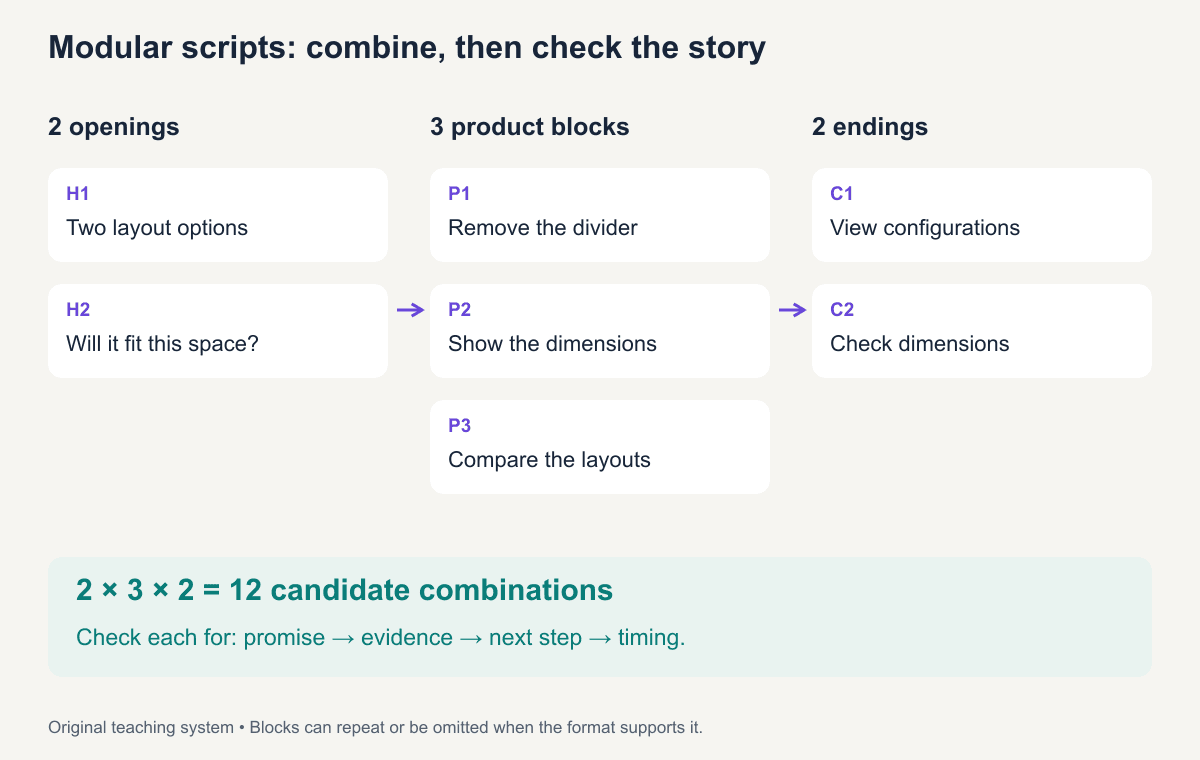
Break the fictional tray script into compatible pieces:
| Block | Option | Content |
|---|---|---|
| Opening | H1 | “One tray, two ways to arrange it.” |
| Opening | H2 | “Will this fit the space beside your keyboard?” |
| Product | P1 | Show the divider being removed |
| Product | P2 | Show the footprint with dimensions |
| Product | P3 | Compare the two layouts at the same scale |
| Ending | C1 | “View both configurations.” |
| Ending | C2 | “Check the dimensions before choosing.” |
Two openings × three product blocks × two endings gives 12 candidate combinations. It does not give 12 equally useful ads. H2 followed only by P1 leaves the fit question unresolved unless you add the dimension evidence. C2 needs a destination where dimensions are accessible.
Maintain a compatibility check for every combination: does the opening’s promise get answered, does the product block support it, does the ending follow logically, and does the total duration fit? You can include H1 → H2 → P1 → C1 when both openings serve the story, but check whether the second one simply delays the demonstration.
Download the editable script blocks and the 12-candidate variant register. Keep IDs, versions, shot requirements, destination, and claim sources with the script so editors can assemble a variation without losing the reasoning.
Pick a small set of variants with clear learning goals
Use the block register to make deliberate choices before assembling all 12 candidates:
| Version | Blocks | What it answers | Why keep it |
|---|---|---|---|
| Layout introduction | H1 → P1 → P3 → C1 | What changes when the divider is removed? | Complete demonstration of the opening's promise |
| Fit consideration | H2 → P2 → C2 | Will the footprint suit my space? | Measurement evidence matches the opening and action |
| Open question, incomplete answer | H2 → P1 → C2 | Asks about fit but only shows the divider | Revise by adding P2 before using it |
If you want to compare openings, keep a core product sequence that answers both, such as P1 plus P2, and use the same compatible ending and destination. If you change the opening, demonstration, and offer together, record that you are comparing complete concepts. Recalculate runtime whenever you add a block.
For apparel, substitute a fit or layering demonstration for the tray mechanism. For a preparation product, show the actual preparation sequence. Preserve the relationship between the opening question, visible answer, and destination.
Review the script before production
Read it aloud with the planned pauses. Point at the image or shot for every product claim. If a line has no evidence asset, revise the line or obtain the asset before editing.
Then run three checks:
- Understanding: Can a person unfamiliar with the product name it and explain the message after one viewing?
- Truthfulness: Do the product, selected variant, demonstrations, terms, and destination agree?
- Execution: Can the footage, captions, audio, and action fit the placement without rushed delivery?
Preview the script’s closing action using the CTA promise audit. When the script and shot list are ready, move to the commercial video production workflow.
Ready to produce the product ad? Explore ReelFlock’s video workflow with the reviewed brief. Keep your chosen hook, factual claims, and closing action together when reviewing the result.
Frequently asked questions
How long should a marketing video script be?
Use the length required to make one useful, supported point in the chosen placement. Treat word-count estimates as a starting point and time a real read with the demonstrations and pauses included.
Should a marketing script include camera directions?
Include the directions needed to communicate and prove the message: product orientation, important close-ups, continuous actions, text, and audio. Leave decorative choices open when they do not affect the claim or production requirements.
How do I create variants without rewriting everything?
Reuse compatible, versioned blocks. Change one variable when you want a clean comparison, and review every assembled version for promise, proof, timing, and destination consistency.