
What is a video script?
You need a creator to explain your product, but the brief says only “show the fit.” The resulting footage may miss the measurement a shopper actually needs. A video script makes that instruction concrete: it plans what viewers will see and hear, in sequence. To write one, define a single viewer outcome, outline the necessary information, draft the spoken words alongside the visuals, and revise after a timed read-through.
The script does not need to look like a screenplay. A product demonstration, sizing guide, or customer-support video can use a simple table with time, picture, spoken words, on-screen text, and production notes. Choose a format that helps the people making the video do their work.
| Document | Main question | Typical contents |
|---|---|---|
| Outline | What should this cover, in what order? | Main points and supporting steps |
| Script | What will the viewer see and hear? | Spoken words, visuals, text, audio |
| Storyboard | How will the sequence look? | Frames showing composition and action |
| Shot list | What must we capture? | Shot IDs, setup, framing, action, assets |
These documents can be linked without repeating every detail in all four. A script row can reference a shot ID, while the shot list handles lens or setup information.
Choose a script format for your video
Use a word-for-word script when wording matters: a precise instruction, a product condition, a carefully timed narration, or an unfamiliar presenter. Make it sound spoken rather than like a written essay.
Use a bullet-point script when a speaker can explain the subject naturally and the exact wording is flexible. Keep the essential facts, sequence, and exclusions explicit. An unscripted delivery still needs a plan for what must be shown.
Use an audio-visual table when pictures and words carry different parts of the explanation. This is especially useful for demonstrations, screen recordings, and videos with captions or several production contributors.
Start with the task you are handing off. A seller explaining how to compare shirt sizes needs a precise demonstration; a creator discussing styling preferences may use bullet points. Product facts and essential steps stay fixed in either format. Persuasive openings, offers, and ad variations are covered in the marketing script guide.
Step 1: Define the viewer, purpose, and takeaway
Complete this sentence before writing dialogue:
After watching, [viewer in a specific situation] will be able to [one observable task or takeaway].
For our original teaching example: “After watching, a shopper will be able to measure a shirt’s flat half-chest consistently and compare it with a labeled garment table.” This gives us a practical result and a boundary. The video will not choose a guaranteed size or explain every garment measurement.
If you are creating a script for a video about a complex topic, narrow the task or allow more time. “Understand our entire product range” is too broad for a brief demonstration.
Write down what the viewer already knows and what equipment they have. This example assumes a shirt, a flat surface, and a tape measure. Show those items at the start so the viewer can follow along.
Step 2: Create an outline before writing dialogue
Arrange the information in the order needed to complete the task:
- Name the measurement and what it is used for.
- Prepare the shirt without stretching it.
- Show exactly where the tape starts and ends.
- Explain the number and its units.
- Warn against comparing a half-width with a body circumference.
- Recap what to compare on the product page.
Now test necessity. A history of shirt sizing does not help the viewer perform this task. A warning about half versus full circumference does. Remove interesting detours that delay the essential action.
Map each point to a visible asset. The underarm line needs a clear overhead shot; a presenter saying “measure here” without showing the endpoints is insufficient. A distinction between body and garment measurements needs a labeled visual or an equally clear explanation.
Step 3: Write the words and visuals together
Draft one row per information beat. Write dialogue you can say naturally, then specify what the visual must reveal. Avoid instructions such as “show an engaging shot” when the real requirement is “both underarm endpoints and the tape must be visible.”
Keep spoken words separate from production notes. An editor should not mistake “hold for two seconds” for a caption. Identify whether text is an accurate caption of speech, an additional label, or an instruction card.
When a fact appears in both speech and text, check that the values match. If you use 54 cm in the example, do not let a later graphic show 56 cm. A single source sheet helps prevent these handoff errors.
To develop your product-video outline, open ReelFlock’s script generator with your verified selling points and audience. Check each proposed line against its visual before moving on to the timed read-through.
Step 4: Read aloud, time, and revise
A word budget helps before recording:
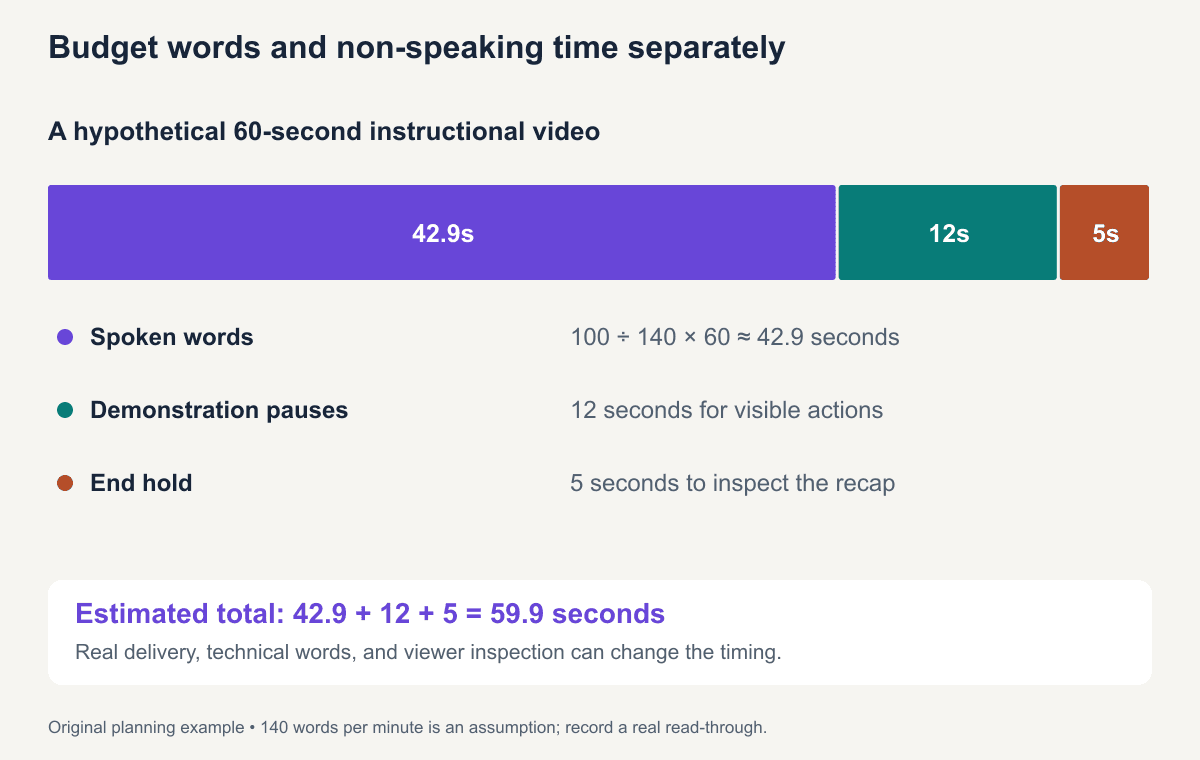
estimated spoken seconds = words ÷ planned words per minute × 60
Then add pauses, demonstrations without speech, and any opening or end hold. A hypothetical 100-word narration at an assumed 140 words per minute uses about 42.9 seconds. Adding 12 seconds of demonstration pauses and a 5-second hold brings the estimate to 59.9 seconds.
The speaking rate is a planning assumption, not a universal ideal or a measured performance. A presenter may speak differently, technical words take time, and viewers may need to inspect the picture. Record a read-through with the intended person and adjust the table to the actual result.
If the script runs long, cut repeated information or split the task. Speeding the narration can make an instructional video harder to follow. Let a demonstration complete before moving to the next instruction.
A video script template and a completed example
Use these fields for a first draft:
Title:
Viewer and situation:
One task or takeaway:
Target runtime and placement:
Facts and their sources:
Required props or screen state:
For each beat: ID | target time | visual | spoken words | text | audio | notes
Final review: accuracy | understanding | timed read | assets | destination
Here is a complete proposed 60-second script. The 54 cm measurement is fictional and chosen only to illustrate the method. Timing remains a production target until a read and demonstration are recorded.
| Target time | Visual | Spoken words | Text or production note |
|---|---|---|---|
| 0–6 seconds | Overhead view of a shirt and tape on a flat surface | “Comparing a shirt size? Start with a shirt you already like.” | Flat half-chest measurement |
| 6–15 seconds | Fasten shirt; smooth it without pulling | “Fasten it, lay it flat, and smooth the fabric without stretching.” | Show the whole preparation |
| 15–25 seconds | Place tape from one underarm edge to the other | “Measure straight across, from one underarm edge to the other.” | Both endpoints visible; pause for inspection |
| 25–34 seconds | Close-up of example tape reading | “This example is fifty-four centimeters across. That is a flat half-chest measurement.” | Fictional example: 54 cm flat half-chest |
| 34–44 seconds | Diagram labels 54 cm × 2 = 108 cm | “Doubling gives an approximate garment circumference of one hundred eight centimeters.” | 54 × 2 = 108 cm; not a body measurement |
| 44–54 seconds | Side-by-side garment table and measurement method | “Compare like with like. A body-size chart and a garment table describe different things.” | Body chart ≠ garment measurements |
| 54–60 seconds | Recap still showing underarm line | “Check the product page’s measurement method before choosing a size.” | Compare method, label, units, and size |
For a real page, use that garment’s published method. The purpose of the sample is consistency, not a universal rule for how all brands measure shirts. The clothing description tutorial explains how the table can support the buying decision.
Download the script template and completed example. The editable file keeps the visual, speech, and notes in separate fields.
From the approved script to a production plan
Turn the visual column into an asset list. For the example, you need one shirt, a tape with readable units, a stable overhead view, a close-up, and two original graphics. Record those as shot or asset IDs, then reference the IDs in the script.
Group capture by setup rather than story order. You can film the wide preparation and final recap in one setup, then capture the close-up with the tape. Preserve continuity: use the same shirt, fastening state, units, and measurement line.
Before handoff, identify what is missing. If the tape cannot be read in the footage, the editor needs a new shot or an explicitly illustrative diagram. A graphic should not silently turn an unclear measurement into purported physical proof.
Approve factual wording and asset requirements before polishing transitions. Lock a version number for recording, and keep changes visible so the presenter and editor do not work from different drafts.
Fix common script handoff problems
| What goes wrong | Likely gap in the script | Useful revision |
|---|---|---|
| The creator talks about fit while showing a beauty shot | The visual column does not specify the required evidence | Name the measurement, framing, and visible endpoints |
| The editor cannot tell which shot belongs to a line | Assets lack stable IDs or exact variant labels | Attach shot IDs and the SKU to each relevant row |
| The narration fits but the demonstration rushes | The time estimate counts speech alone | Add the full action, inspection pause, and end hold |
| Captions repeat an outdated number | Text and graphics come from different versions | Check all values against the same approved fact sheet |
| The audience cannot perform the next step | A prerequisite or instruction is missing | Show the required item and state the action explicitly |
For the shirt example, “show the tape” becomes “overhead shot of both underarm endpoints, with the tape flat and units readable.” That instruction tells the creator what to capture and gives the reviewer a clear way to accept or reshoot it.
Review a script for understanding
Ask someone to explain the task after reading or watching a rough version. For this example, ask where they would place the tape and whether they would compare 54 cm with a body chest circumference. Their answer identifies whether the key distinction survived.
Then preview on the intended device. Check captions against the spoken words, avoid placing essential labels under interface controls, and keep the tape and endpoints visible at a useful size. For a marketing video, add the message and CTA review; for production, use the commercial video workflow.
Plan captions in the script handoff, including relevant non-speech sounds when they carry meaning. W3C’s prerecorded-caption guidance explains their role in making synchronized audio available to people who cannot hear it. Review generated captions rather than assuming transcription is accurate.
Frequently asked questions
How do I make a script for a video if I am a beginner?
Choose one small viewer task. Outline its necessary steps, write what the viewer sees beside what they hear, and read it aloud while performing the actions. A clear table is enough for a first script.
Should I write every word or use bullet points?
Write every word when precision or timing matters. Use bullets for a confident speaker whose wording can vary, while fixing essential facts and demonstrations. You can combine both approaches in one production document.
How long should a two-minute video script be?
Calculate from your speaker and the non-speaking parts. At an assumed 140 words per minute, two uninterrupted minutes would be 280 words. If demonstrations and pauses need 30 seconds, the spoken budget would be about 210 words. Verify it with a timed read.