
A commercial storyboard is a sequence of panels showing how an advertisement will unfold. Each panel connects a visual moment to its timing, audio and essential text. For an ecommerce video, it should also establish what the shopper needs to see before believing the product's main promise.
You do not need polished drawings to begin. A rough frame, a reference photo or a written composition can help a team agree on the commercial before spending time on production. The useful test is whether someone else can understand what to create and how to judge the result.
What belongs in a commercial storyboard?
A basic storyboard records the shot, action, duration, voiceover or dialogue, on-screen text and transition. Commercial storyboard examples commonly use numbered panels with notes so everyone can discuss the same moment. Storybrdr: Commercial storyboard template.
For product advertising, add two practical fields: what the shot must establish and which source will support it. Those fields reveal a weak demonstration before the team makes it.
“The pouch is spacious” is a claim. “The viewer sees these three named items fit into this exact pouch” gives production an observable task. A real packing demonstration and verified dimensions support the second statement; an attractive generated interior does not establish capacity.
Start from a single buying decision
Before drawing panels, complete this sentence:
After watching, the intended shopper should understand ______ and be able to ______.
For a fictional travel-pouch commercial: “The shopper should understand the internal layout and be able to check whether the dimensions suit their packing routine.”
Then choose one principal buying question. An ad about capacity needs room for the items, the opening and the finished packed view. Adding durability, water resistance, gift packaging and every color to the same short ad can make the actual demonstration rushed.
Keep the creative brief nearby. The brief defines the audience, promise and constraints. The storyboard translates that direction into visible moments. A shot list later expands the approved moments into the practical coverage needed for production.
Use this copyable storyboard template
Copy the following into a document or sheet. Add a sketch or reference image beside each row if it clarifies framing.
Project:
Product and exact variant:
Audience and buying question:
Main message and evidence:
Placement, aspect ratio and target duration:
Destination and CTA:
Version, owner and approval date:
| Panel / time | Composition and action | Audio | Essential screen text | What the shot must establish | Source and acceptance check |
|---|---|---|---|---|---|
| 1 / start–end | Subject, framing and movement | Voice, sound or silence | Only the necessary words | What the viewer learns | Asset reference and pass condition |
| 2 / start–end | |||||
| 3 / start–end | |||||
| 4 / start–end | |||||
| 5 / start–end |
Add production notes beneath the table for props, continuity, usage rights and alternate versions. Keep shot-specific notes in the row where they affect the viewer's understanding.
A complete 15-second product commercial example
The following is a fictional teaching example for a blue travel pouch. It assumes the seller has verified the product and recorded the packing action. The example makes no claim about campaign performance.
Audience: Travelers deciding whether the pouch suits their daily essentials.
Message: See the compartment layout and check the dimensions before choosing.
Format: 9:16 vertical, 15 seconds.
CTA: Check dimensions and colors on the product page.
| Panel / time | Visual action | Voiceover | Screen text | Evidence and acceptance check |
|---|---|---|---|---|
| 1 / 0–2s | Overhead view of a charger, cable and earbuds beside the pouch | “Where do your travel essentials go?” | “One place for the small stuff” | All props and the actual blue variant visible; no implied size comparison |
| 2 / 2–5s | Open the pouch fully and show its compartments | “Start with a clear layout.” | “See the inside” | Real interior matches the sold product; opening is unobstructed |
| 3 / 5–9s | Place the three items into their intended spaces | “Pack the items you use together.” | Names of the three items, if needed | Real packing footage; any cut preserves the item count and arrangement |
| 4 / 9–12s | Close the pouch and turn it to show the packed profile | “Then check the packed size.” | “Compare with your essentials” | Same pouch and contents; closure shown without hidden substitution |
| 5 / 12–15s | Stable product view with space for the CTA | “Check dimensions and available colors.” | “View sizes and colors” | CTA readable in the intended placement; destination matches the product |
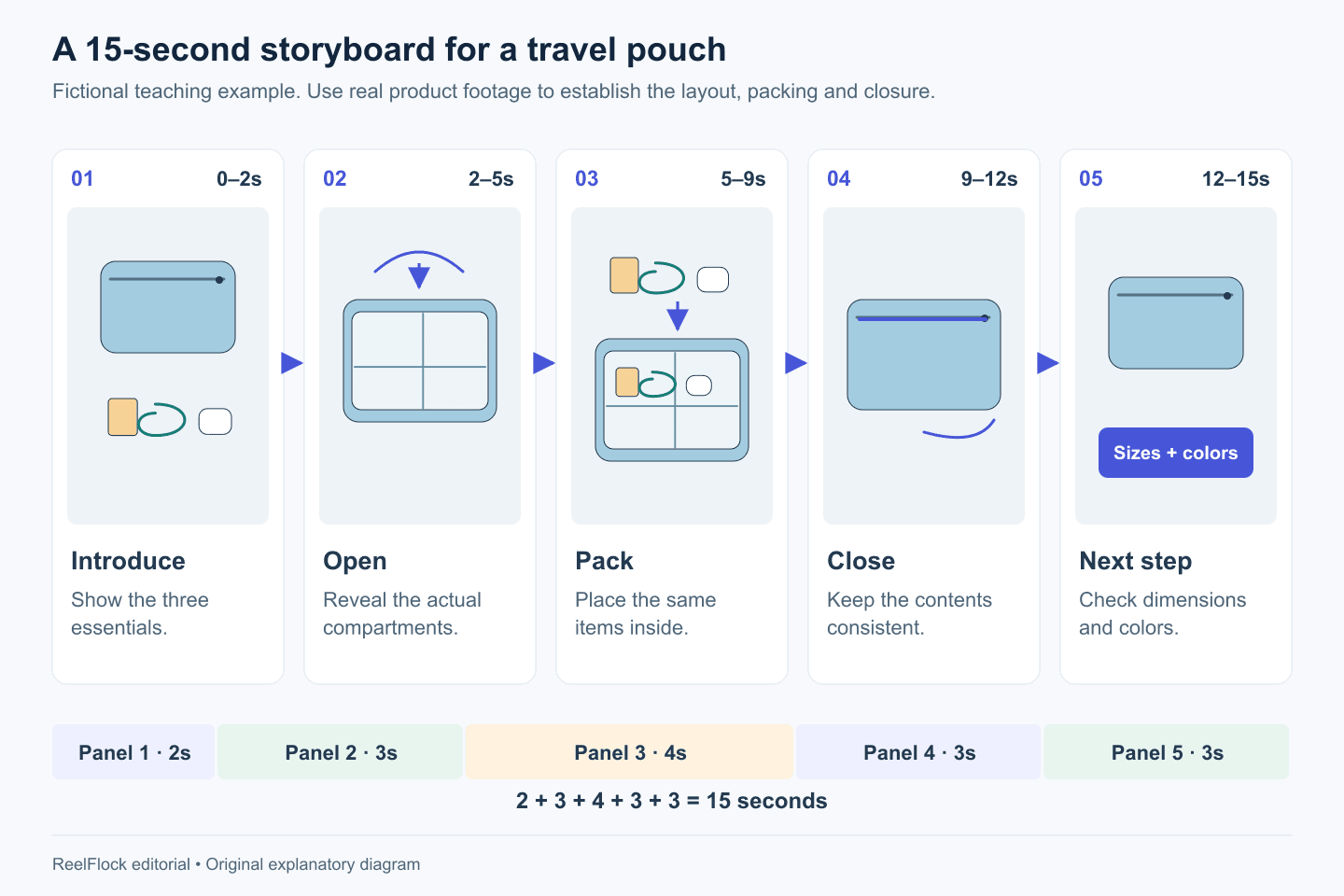
The fictional pouch storyboard gives each panel one job. The drawings explain composition; real product footage must establish the packing and closure.
The timeline adds up to 2 + 3 + 4 + 3 + 3 = 15 seconds. Each panel has one main job. The sequence lets the shopper inspect the layout before the ad asks them to act.
If the actual packing takes longer than four seconds, adjust the plan. Show an honest sequence at a legible pace, or reduce the number of items. A shorter commercial is useful only when the buyer can still understand the evidence.
Test the board before producing the video
Read the voiceover aloud while advancing through the panels on a timer. Leave room for pauses, product action and the final CTA. A script that fits on paper may still crowd the visual demonstration.
Then review the board without audio. Can someone identify the product, understand the action and see the next step? Finally, listen without looking at the panels. Does the narration make a claim the images fail to establish?
This simple rehearsal is an animatic in its most basic form: a timed sequence used to inspect the plan. You can assemble rough frames in an editor if motion or transitions are hard to judge from the table.
Mark the weakest moment. In the example, panel 3 carries the capacity evidence. If that action is unclear, improving the opening animation will not solve the central problem.
Plan real evidence and generated scenes deliberately
Separate a scene's storytelling role from its evidentiary role. A generated hotel-room setting can suggest travel. A claim about how much fits in the pouch needs trustworthy product evidence.
For each scene, choose its source:
- Real product footage: Use when physical behavior, fit, texture or a demonstrated result matters.
- Verified product imagery: Useful for a controlled introduction or detail explanation.
- Generated contextual imagery: Useful for a setting or creative treatment, reviewed for product accuracy.
- Customer experience: Requires a genuine attributable source and appropriate permission.
Put a visible hold on a panel when its evidence is missing. Resolve the source or narrow the statement before producing the rest of the commercial. This prevents an unfinished proof shot from becoming an invented performance claim.
Preserve continuity across shots
Continuity matters because viewers infer that consecutive shots show the same product and action. Record the variant, orientation, props, contents and lighting conditions that must remain consistent.
For the pouch, the cable should not disappear between packing and closing. For a skincare product, a lighting change should not create the apparent result. For an assembly video, do not introduce parts that were absent from the package.
Create a small continuity reference before filming or generating alternatives. Include the product images, approved palette, visible labels and any critical dimensions. Review every output against it.
Make variations without weakening the central demonstration
Once the sequence works, mark which panels can change. In the example, the opening could vary between a packing question and a cluttered-bag situation. Panels 2–4 preserve the same product explanation, while the final CTA can match a different legitimate destination or offer.
This gives the team a controlled variation plan. It also shows which assets can be reused and which require new production. A new capacity promise requires new supporting evidence; a different opening question may reuse the approved demonstration.
For a longer cut, add detail that answers another real objection. Avoid stretching every panel solely to meet a duration target.
Turn the storyboard into a ReelFlock production brief
The board now contains the material a product-video workflow needs: product facts, a buying question, a scene sequence, script wording and acceptance checks. Carry those approved facts and creative directions into ReelFlock to develop product-video variations and assign production across the appropriate accounts.

A ReelFlock reference template separates visual direction, on-screen text and voiceover by timed scene. Screenshot captured November 3, 2026; the reference is separate from the fictional pouch example.
Treat the storyboard as direction and a review reference. Exact frame reconstruction or direct storyboard import is not established here. Keep the source footage for demonstrations whose accuracy matters, and review generated outputs against the same acceptance checks.
Use ReelFlock to develop the product-video batch after the first storyboard has passed the timing, evidence and continuity checks.