
Content automation uses software and repeatable rules to move content through planning, creation, review, distribution and measurement. It can apply to articles, emails, images or videos. For an ecommerce seller producing TikTok content, its practical value is connecting product information to a reliable stream of useful product videos.
Begin with a small workflow you can inspect. You should be able to identify the product behind every script, the account assigned to every output, and the person who approved its release. That makes it possible to increase production without multiplying avoidable errors.
What should you automate first?
Choose a task that happens repeatedly, has dependable inputs and produces an output you can evaluate. Copying approved product facts into a script brief is a better starting point than asking software to decide which unverified claims will sell.
| Stage | Useful automation | Human decision to retain |
|---|---|---|
| Product intake | Import available product records | Are the specifications and variant details accurate? |
| Planning | Organize approved buying questions and content requests | Which question matters for this product? |
| Scripts | Draft variations from product facts and a brief | Is every promise supportable and clear? |
| Production | Generate or prepare repeatable video outputs | Does the video represent the actual product? |
| Assignment | Distribute production work to available accounts | Is each account appropriate and eligible? |
| Publishing | Execute the approved release workflow | Are the offer, destination and permissions current? |
| Review | Collect results into a consistent reporting record | What should change in the next batch? |
Broad automation platforms describe workflows that connect planning, review and scheduling across applications. A TikTok product workflow needs more detail about the merchandise, evidence and account behind each post. Zapier: Content automation.
Start with a product record that can survive reuse
Create one working source for the facts a script may use. A product URL can be an input, but someone should inspect what it contains. A page with several sizes or bundles can easily produce a script about the wrong combination.
For each product, record:
- Product identifier, exact variant and destination.
- Verified specifications and included items.
- Intended buyer and the problem being addressed.
- Approved benefit statements and their evidence.
- Available photos, real demonstrations and usage rights.
- Current offer terms and their expiration conditions.
- Claims or situations the production must avoid.
Separate durable facts from temporary information. Dimensions may remain stable while price, stock and delivery promises change. Give temporary information a named owner and a check before release.
For a fictional insulated lunch bag, “removable divider included” can become a script input after checking the actual pack contents. “Keeps food safe all day” needs evidence appropriate to that claim; a photograph of the bag provides none.
Define the output before choosing tools
“Make more TikToks” gives an automation too little direction. Specify a small output contract: which product, which buyer question, which type of video, which account, and what approval is required.
A useful request could read:
Produce three short product-video concepts for the lunch bag: packing layout, divider setup and carrying size. Use the approved product record. Keep the featured color consistent. End each script by asking shoppers to check the dimensions and available colors. Require product-owner review before release.
This request creates three distinct answers. It also provides acceptance criteria a reviewer can use. If a tool generates three nearly identical introductions, the team can identify the missing variation immediately.
Build a workflow with visible handoffs
Use explicit states in your planning sheet or project tool. The following is a suggested operating model; it does not assume a particular product exposes these exact labels.
| Working state | Entry requirement | Exit requirement | Responsible person |
|---|---|---|---|
| Ready for script | Product facts and question approved | Draft exists with evidence references | Content owner |
| Ready for production | Script and assets approved | Video output available | Producer |
| Ready for review | Correct product and account recorded | Reviewer accepts or requests a specific change | Product reviewer |
| Approved for release | Video, description and destination checked | Publishing result recorded | Publisher |
| Needs attention | A defined failure or change occurred | Issue corrected and affected output rechecked | Owner of that issue |
Keep “generated” and “approved” separate in your records. A completed file can still contain a wrong product, unreadable price or unsupported statement.
Run generated videos and finished uploads through two lanes
Many sellers have both new AI-assisted creative and finished footage from creators, staff or an agency. Preserve those two inputs.
The generation lane starts with product information and a script. It needs concept review, visual review and checks that generation has preserved the merchandise accurately.
The finished-video lane starts with an existing export. It needs confirmation of usage rights, correct version, caption, destination and publishing account. Rebuilding that video adds work unless a specific correction is required.
Both lanes can meet at a common release checklist. They should retain their origins so someone can trace a problem to the right source. A creator-rights problem and an AI rendering error require different fixes.
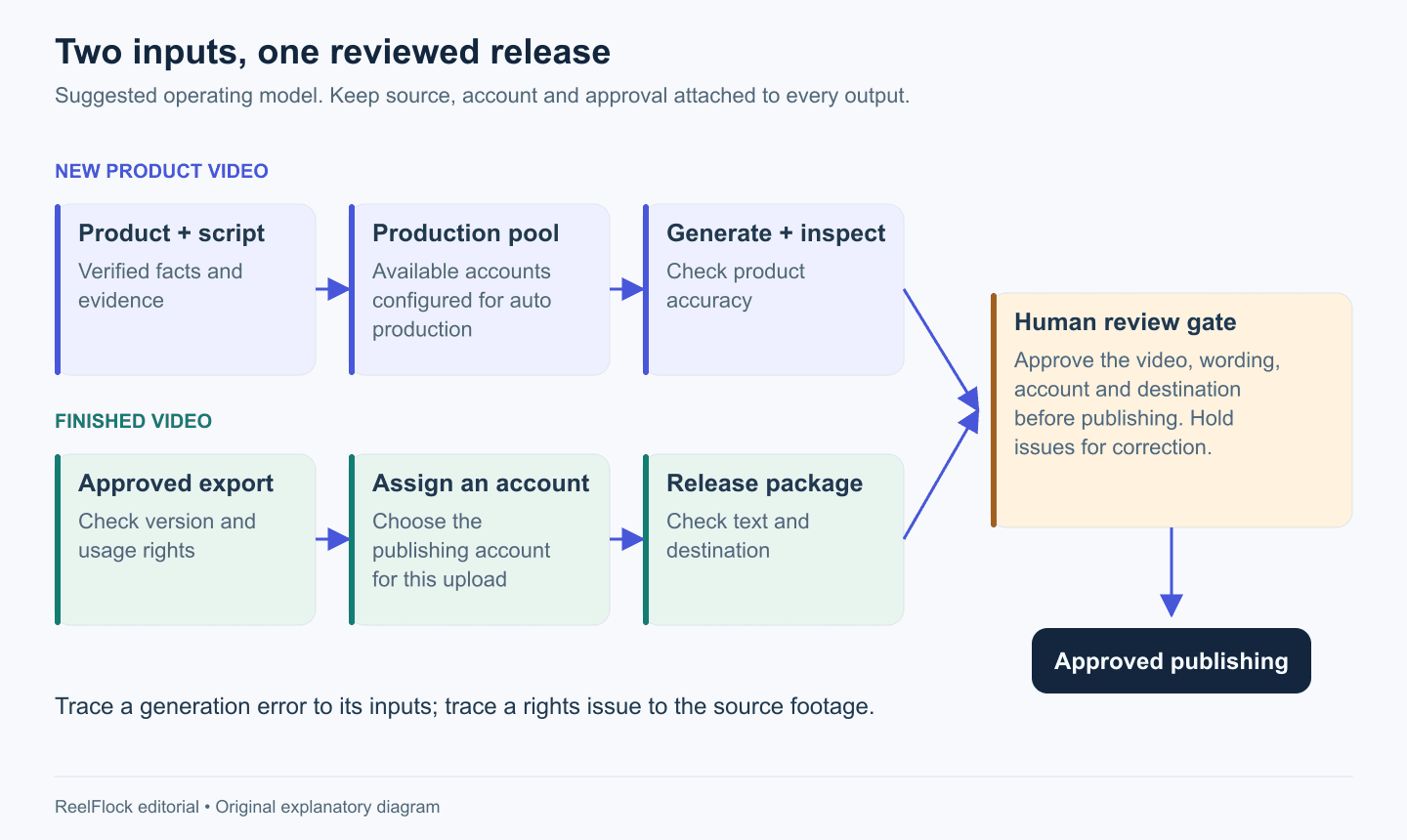
Keep the two input paths distinct and bring them together at review. Original operating model; these boxes are planning stages, not exact interface labels.
Work through a small batch before expanding
Consider a fictional seller with two lunch-bag variants and three buyer questions. The seller wants two openings for each product-question pair.
The plan contains 2 products × 3 questions × 2 openings = 12 videos. Those are planned outputs, not twelve guaranteed publishable files.
First produce one representative sample for each product-question pair: six samples. Review the bag shape, divider, color, spoken claims and CTA. If the divider appears incorrectly in every sample, fix the shared input before producing the second opening for each pair.
Once the samples pass, complete the remaining variations. Assign outputs to the suitable accounts in the campaign plan; account count does not automatically multiply the twelve-video target.
This sample gate costs some attention early and limits the spread of a shared error. It is especially useful when the batch includes several variants that look similar.
Decide when the workflow should stop
Write stop rules before the first large batch:
- A product claim lacks evidence: hold the affected scripts.
- A source image belongs to another variant: correct the product record and inspect related outputs.
- A creator's usage permission has expired: hold content that uses that asset.
- An account has lost the required authorization: pause its publishing work.
- The offer has changed: recheck the video, description and destination wherever that offer appears.
Give each issue an owner. “Needs fixing” is less useful than “product owner must confirm whether the divider is included.” Retry a failed render only after distinguishing a technical failure from a bad input; repeating a bad input reproduces the same defect.
For publishing problems, inspect the current job result and the live account before retrying. A network timeout can leave the caller uncertain about whether a post succeeded. Your operating process should resolve that uncertainty before creating another post.
Measure usable output and learning
Track approved videos alongside generated files. A practical batch report includes planned outputs, reviewed outputs, approved outputs, rejection reasons and publishing outcomes.
Then review content performance separately. Record the product, buying question, opening, account and offer version. Use those identifiers to compare similar work and choose the next question to answer.
Avoid treating one successful post as proof that the whole workflow is effective. If a campaign produces many files but reviewers reject most of them for the same product error, improve the shared input before increasing volume.
Put the production stages into ReelFlock
ReelFlock can carry product intake, script development, account assignment and batch product-video creation into one workflow. For finished videos, upload the approved export and assign its publishing account. Review the content and approve release before the publishing workflow proceeds.
Use the same product record in both lanes. The lunch-bag campaign can combine generated product explanations with a real packing demonstration, while the seller keeps the claims and release checks consistent.
Start a TikTok content workflow in ReelFlock with one product family, a small batch and a named reviewer. Expand after you know where errors appear and how your team resolves them.