
For an auction Non-Spark TikTok video ad, the official specifications allow a recommended vertical 9:16 format at a minimum of 540 × 960 pixels, a file up to 500 MB, and a duration up to 10 minutes. Reservation placements and Spark formats have different rules.
For most ecommerce creative planning, a 1080 × 1920 vertical master is a practical working choice. Treat it as a production recommendation. The accepted specification depends on the placement you actually select in TikTok's advertising tools.
TikTok video ad specifications by format
The video-placement table below was checked against TikTok's official pages on November 3, 2026.
| Placement and upload path | Aspect ratio and minimum dimensions | Duration | File and bitrate |
|---|---|---|---|
| Auction In-Feed, Non-Spark | 9:16 recommended: 540 × 960; 16:9: 960 × 540; 1:1: 640 × 640 | Up to 10 minutes | MP4, MOV, MPEG, 3GP, AVI; ≤500 MB; ≥516 kbps |
| Reservation In-Feed, Non-Spark or Spark Push | Same three ratios and minimum dimensions | 5–60 seconds; official recommendation 9–15 seconds | MP4, MOV, MPEG, 3GP; ≤500 MB; ≥2,500 kbps |
| TopView, Non-Spark or Spark Push | Vertical 9:16; ≥540 × 960 | 5–60 seconds; official recommendation 9–15 seconds | MP4, MOV, MPEG, 3GP; ≤500 MB; ≥2,500 kbps |
| Spark Pull using an existing post | Check the existing post and selected placement | Official placement pages say no separate restriction; the general Spark overview lists a 10-minute maximum | Auction guidance lists MP4/MOV; confirm the post's availability and authorization |
Sources: Auction In-Feed specs, updated June 2026, Reservation In-Feed specs, updated July 2025, TopView specs, updated October 2026.
Spark Pull and Spark Push appear separately in TikTok's documentation. The placement pages and the general Spark overview also differ on duration wording: the overview lists a 10-minute maximum. For a longer existing post, confirm acceptance in the selected campaign before commissioning the edit.
Choose the placement before approving the edit
A seller making a product demonstration needs to decide where the video will run. An ordinary TikTok post, an auction Non-Spark ad and a reserved TopView placement have different release requirements.
For a fictional kitchen-tool campaign, a 20-second demonstration may fit the planned auction creative. If the media plan changes to a reservation placement, inspect that placement's duration, sound, caption and approval requirements before handing over the same file.
Record the placement and source specification URL in the creative brief. This prevents a designer from exporting to a generic “TikTok format” while the buyer expects a specific ad product.
The longest accepted duration is a technical ceiling. Give the demonstration enough time to establish its claim and next action, then remove repetition. A longer file is useful only when the explanation earns that time.
Design around the correct safe zone
TikTok provides downloadable safe-zone files on its specification pages. The usable area depends on orientation, caption length and additional interface elements such as anchors. A long caption or an add-on can cover more of the picture. The official guidance also warns that previews and live devices may differ. TikTok's auction safe-zone guidance.
Use this workflow:
- Download the template for the actual placement and language direction.
- Select the appropriate version for anchors or other relevant add-ons.
- Place that guide over the edit as a temporary review layer.
- Keep the product's critical action, required text and CTA readable within it.
- Remove the guide from the export.
- Preview again with the intended caption and interface.
TopView has an opening takeover stage and an in-feed stage. Check both views using its own guidance. A product label visible in the center of a clean master can still be obscured after the interface appears.
Avoid treating one published set of pixel margins as universal. The correct template and actual preview give you a more useful check for the intended ad.
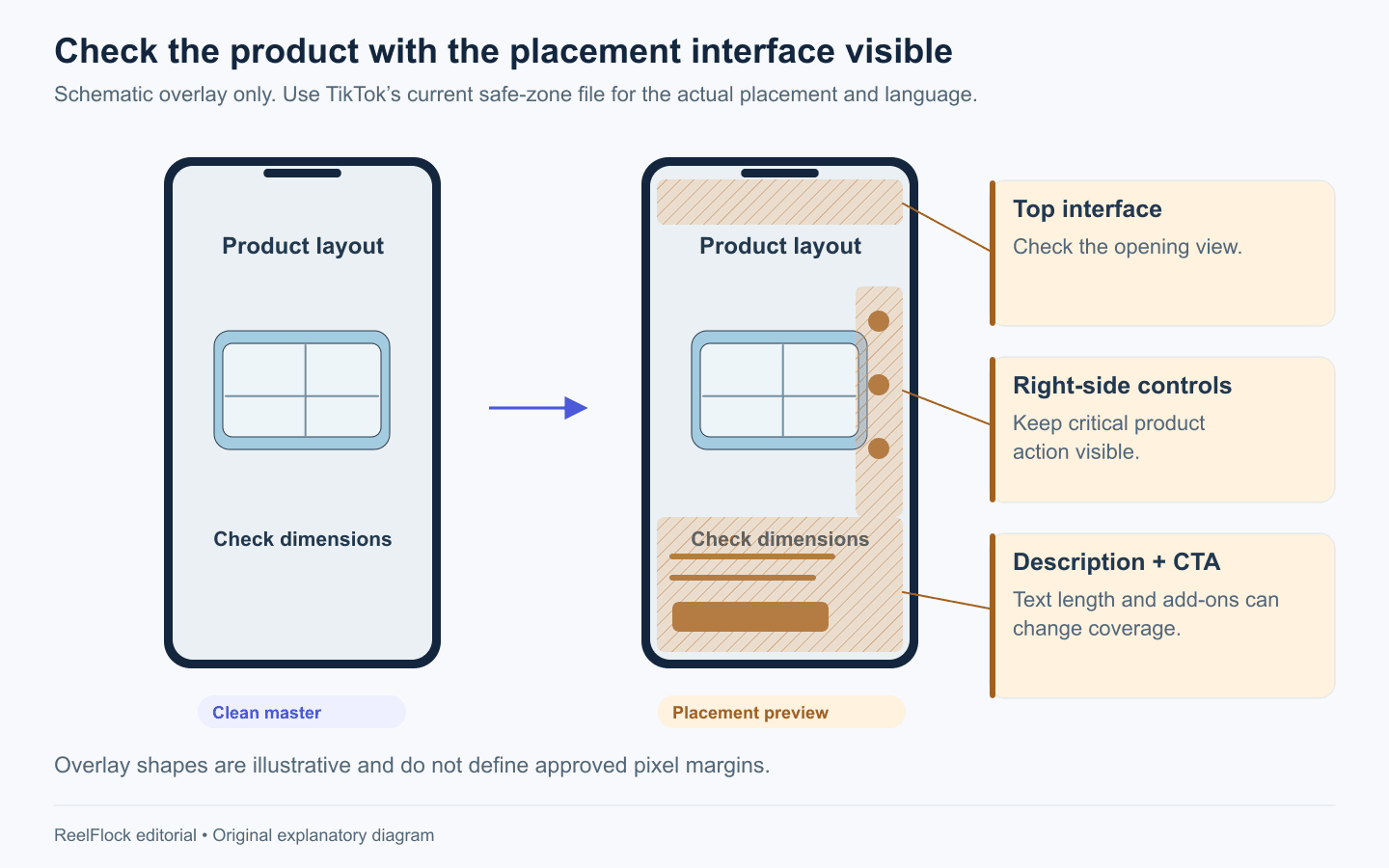
The hatched areas illustrate possible interface coverage. Use the current official safe-zone file and actual placement preview; this diagram defines no approved pixel margins.
Separate post descriptions, subtitles and ad interface text
These text layers do different jobs:
- Post description: Text associated with an organic post; relevant when using that post in a Spark workflow.
- Subtitles: The words spoken in the video, whether added as a caption layer or embedded in the export.
- On-screen sales text: Product names, prices, offer terms and visual CTA copy.
- Ad interface fields: The identity, caption and CTA options provided for the chosen ad format.
Check each layer independently. Making a product name readable in the master does not prove it remains readable beneath the ad interface. Correcting a description does not change an incorrect price embedded in the picture.
Caption display rules differ by placement. Write concise wording that preserves required context, then inspect the actual fields and preview. If a claim needs a qualification to be accurate, shortening the caption should preserve that qualification.
Prepare a practical vertical master
For a new ecommerce edit, a useful internal starting brief is a 1080 × 1920 MP4 master with readable subtitles, clear product detail and space for the selected placement's interface. Choose encoding settings that preserve those details and meet the destination's constraints.
File extension alone cannot establish compatibility. An MP4 is a container; a file can still have an unsuitable internal encoding or a damaged export. Play the finished file from start to finish and test it in the intended upload path.
Keep a clean source project and a final master without editor watermarks or temporary layout guides. Maintain a separate copy when a placement needs different text, cropping or timing. Label exports with product, angle, placement and revision so the publisher can select the right one.
Run an ecommerce preflight
The following release checks complement the numerical specifications:
| Check | Pass condition |
|---|---|
| Product | The video and destination refer to the same variant and quantity |
| Evidence | The demonstration supports the spoken and written claims |
| Offer | Price, dates and conditions agree with the current destination |
| Readability | Product detail and essential text survive the placement preview |
| Sound | Narration is intelligible and the placement's sound requirements are met |
| Rights | Music, footage, creator permissions and planned use are covered |
| Release | Correct account, destination, file revision and approval are recorded |
For commercial music, TikTok recommends its Commercial Music Library and explains that other music requires the necessary rights. A trending sound's presence in the app does not establish a commercial license for your campaign. TikTok: Commercial use of music.
If an upload fails, check the selected format's limits, actual file properties and encoding. If a file uploads but the product is covered, return to the safe-zone and preview checks. Technical acceptance and readable creative are separate review outcomes.
Move approved content into ReelFlock's publishing workflow
Once an externally edited video passes its content checks, you can upload it to ReelFlock, assign the publishing account, add the relevant product and description, and approve it for the automated content-publishing workflow. This gives existing footage a place alongside newly generated product videos.
Check ReelFlock's uploader requirements separately. A file accepted under TikTok's ad specifications may exceed a production tool's own upload limits.
Keep paid campaign setup in TikTok's advertising workflow. Publishing an organic post through ReelFlock does not create an Ads Manager campaign, select a budget or purchase ad delivery. If a published post will be used for Spark Ads, complete the applicable authorization and ad setup there.
Open ReelFlock with one approved master and its intended publishing account, then verify the complete content release path before expanding the batch.