
A shopper asks whether your bag fits a laptop. Another wants to see the inside pockets. A third is ready to buy but cannot find the right size. TikTok gives you several ways to answer these questions: a product video, a photo post, comments, LIVE, and shopping features where your account is eligible.
For an ecommerce seller, the useful starting point is the buyer's next decision. Choose the feature that helps someone understand the product, resolve an objection, or reach the correct listing. Then build a repeatable process around the content that works.
Which TikTok features should sellers learn first?
Use this as a working map for a product campaign. The suggested uses are editorial recommendations; individual controls depend on your account and market.
| Seller task | Feature to consider | Useful content | Check before using it |
|---|---|---|---|
| Demonstrate something that moves | Video post and editing tools | Open a clasp, adjust a strap, pack a bag | The action is visible and the featured variant is correct |
| Help shoppers compare details | Photo post | Measurements, colors, pocket layout | Each image answers one question clearly |
| Learn which questions need answers | Comments and search | Repeated questions about fit or compatibility | Questions apply to your actual product |
| Respond with context | Duet or Stitch | Respond to a relevant demonstration | Source permissions and commercial reuse rights |
| Explain a product interactively | LIVE | Answer questions while showing details | Account access, host readiness, stock and fulfillment |
| Connect interest to a product | TikTok Shop and Showcase | Eligible shoppable product content | Correct shop, account permission and product availability |
| Decide what to make next | TikTok Studio and seller analytics | Review attention, questions and shopping actions | Metric definitions and comparable reporting windows |
Begin with a product video, a clear purchase destination, and a way to review the response. Add features when they serve a buyer question you need to answer.
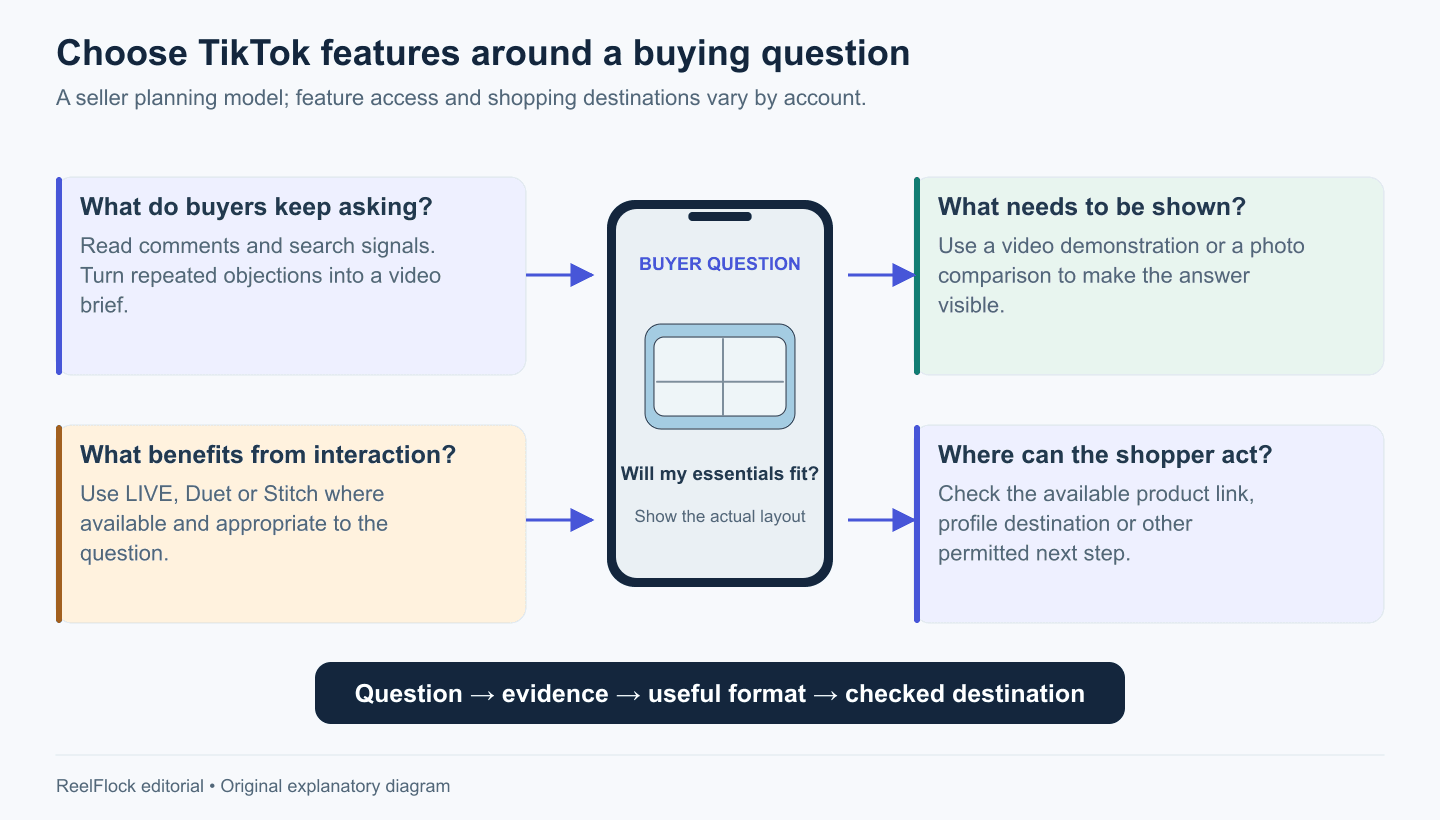
Choose the feature that helps answer the buying question, then check the available next step. Original planning diagram.
Create product videos that answer one buying question
A short demonstration works best when the viewer can identify the question and see the answer. For a bag, “Will my laptop fit?” is more useful than a video that tries to cover style, durability, capacity, packaging and every color at once.
Here is a fictional example for a seller planning a laptop-bag video:
- Open with the question: “Will this bag fit your work setup?”
- Show the empty bag and the exact laptop used in the demonstration.
- Insert the laptop, charger and notebook without hiding the opening.
- Close the bag and show how it carries.
- Direct viewers to the dimensions and available sizes in the listing.
The footage establishes what fits in that particular demonstration. A separate product measurement supports broader compatibility wording. Avoid turning one successful fit into a promise that every laptop of a nominal screen size will fit.
Use trimming to remove waiting time. Use text to identify the model or dimension that matters. Read subtitles carefully, particularly product names and numbers. A decorative effect earns its place only when the product remains easy to inspect.
Keep an original export and the source files outside the app. That gives you a reliable starting point when you need to change a price, correct text, or adapt the video for another placement.
Use photo posts when the shopper needs time to compare
Some information is easier to inspect in still images. A size chart, a side-by-side color comparison, and a packing diagram let viewers pause on the detail they need.
For the same fictional bag, a photo sequence could contain:
- The packed bag with its intended use named clearly.
- External and internal dimensions, with units.
- The laptop compartment shown open.
- The actual color options photographed consistently.
- A final image pointing to the relevant listing.
Check that the first image creates a reason to continue. A generic brand logo provides less context than a view of the bag doing the job the shopper cares about. Make each slide readable without relying on the previous slide's small print.
Turn comments and search into a content backlog
Comments are useful research inputs because they contain the words buyers use. Copy recurring questions into a simple sheet with the product, question, source post and proposed answer. Remove private customer details before sharing the sheet with production.
Group questions by what the shopper needs to see. “Does it fit?” may require measurements. “Is it difficult to clean?” may require care instructions and suitable real footage. “When will it arrive?” belongs with current delivery information.
Where available, TikTok's comment insights can summarize discussion topics and questions. TikTok notes that this feature has availability and age restrictions. Treat its categories as leads to inspect alongside the actual comments. TikTok: Comment insights.
A useful backlog entry has an answer and an evidence source:
| Buyer question | Evidence needed | Next content |
|---|---|---|
| Does the sleeve fit this laptop? | Internal dimensions and a real fit demonstration | Product video |
| What is included? | Current packing list and actual package | Unboxing or photo sequence |
| Can I wash it? | Verified care instructions | Care explainer |
Search can add wording and topics to this backlog. It cannot establish that a popular claim is true for your product.
Use Duet, Stitch and LIVE for questions that benefit from interaction
Duet places your contribution alongside another video; Stitch lets you incorporate part of a source video into your response. These formats can preserve the context of a question or demonstration. Their availability depends on the source video's settings. Apple's TikTok feature guide.
Permission to use a platform feature does not settle every commercial reuse question. If a customer video will become part of a brand campaign, agree on the intended use and keep a record of that agreement.
LIVE is useful when the audience can change the demonstration: requesting a closer view, comparing two sizes, or asking the host to test a specific configuration. Prepare a product list, approved answers and someone to monitor questions. Confirm LIVE access in the account before announcing the session.
For a question that always has the same answer, an edited video can provide a durable reference. Use live sessions to discover the follow-up questions worth recording next.
Connect product content to the right shopping destination
TikTok Shop supports product discovery through videos, LIVE and profile shopping features. Showcase displays products associated with an eligible seller or creator account. The shop and the account presenting its products have different roles. TikTok: Shop and Showcase.
Before publishing shoppable content, inspect the product destination. Does it show the same color, quantity and configuration as the video? Are stock, price and delivery information current? A persuasive demonstration creates extra confusion when it sends a shopper to a different variant.
For a seller directing visitors to an independent store, check the purchase path available to that account. Plan the CTA around an action the viewer can actually take.
Review features by the decisions they help you make
Set up a weekly review around three questions:
- Did people understand the opening? Use the attention metrics available for your posts and inspect where the explanation becomes slow or unclear.
- Did the video answer a buying question? Read comments and note unresolved objections.
- Did interested viewers reach the product? Review available product clicks and order data alongside the listing, offer and stock situation.
Compare posts over similar windows. Different products, audiences and offers introduce other explanations for a result. A high view count alone cannot identify the reason someone purchased.
Build the product-video workflow in ReelFlock
After a few useful demonstrations, the repeated work becomes clear: gather product facts, choose a buying question, write the script, prepare versions for the accounts you operate, and review each output.
ReelFlock can carry that production work forward. Start with a product source, build or refine scripts around its verified selling points, and produce a batch of product videos with account assignments. Keep the buyer-question sheet beside the review queue so every variation still has a purpose. Review the videos before approving publishing.
For the fictional bag campaign, the next batch could cover laptop fit, pocket organization and the packed carrying view. Each version should preserve the correct product details while answering a different question.
Start a product-video batch in ReelFlock with one product and the three questions customers ask most often.