
A UGC video is a video created by a user about a product, service or experience. In ecommerce, the term also commonly describes paid creator videos made for a brand's marketing. Some tools use “AI UGC” for generated ads with a person-led, conversational style.
For a seller commissioning content, specify the source as well as the format. “A real customer's review,” “a paid creator's demonstration” and “an AI-assisted product explainer” produce different kinds of evidence. That decision determines whom to hire, what to ask for and where the result can be used.
Choose the source that can answer the buyer's question
| Source | Useful assignment | Important limitation |
|---|---|---|
| Existing customer | Describe a genuine experience | Preserve what the customer actually means and agrees to share |
| Commissioned creator | Demonstrate, explain or try the product | A scripted review still needs an honest basis |
| Seller or staff member | Explain features and usage | Make the relationship and commercial context clear |
| AI-assisted presentation | Explain verified facts in varied creative treatments | It cannot supply a real person's experience |
The FTC's US endorsement guidance requires honest opinions and clear disclosure of material connections where relevant. Briefing a creator should preserve their truthful account. FTC: Endorsement Guides questions and answers.
If you need a customer to explain how a product performed over several months, arrange that real experience. If you need to explain the parts included in a package, verified product materials may support a more straightforward production route.
Match the video format to the missing information
Unboxing: clarify what arrives
Use an unboxing when packaging, included items or first setup affect the purchase decision. Ask the maker to identify the exact version and show the contents clearly. A gift set and a standard single product should have separate briefs if the pack contents differ.
Demonstration: show an action
A demonstration answers “How does it work?” or “Can I do this?” Prioritize an unobstructed view of the mechanism and enough time to understand the sequence. Cutaways can make an edit lively while concealing the only action a buyer needs to inspect.
Tutorial: help the buyer complete a task
A tutorial explains a useful sequence, such as adjusting a strap, arranging a shelf or cleaning a component according to its instructions. Name prerequisites and show the finished state so viewers can tell whether they followed the steps correctly.
Review or testimonial: describe an experience
This format depends on an actual experience and a source willing to stand behind it. Preserve relevant conditions and limitations. A customer quote about one specific use should retain that meaning when edited for a shorter video.
Comparison: make a trade-off visible
Compare real products or configurations using consistent criteria. Show what differs and why that difference matters to the intended buyer. A carefully chosen criterion is more useful than an unqualified “best” claim.
Lifestyle or routine: establish relevance
Place the product in a recognizable situation. The routine should explain how the item fits that situation while keeping the merchandise visible. Atmospheric footage alone may leave the viewer unsure what the product actually does.
Examples libraries often organize UGC by these visual formats. Use references to understand structure, then write the brief around your own buyer's unanswered question. UGC Examples: Format library.
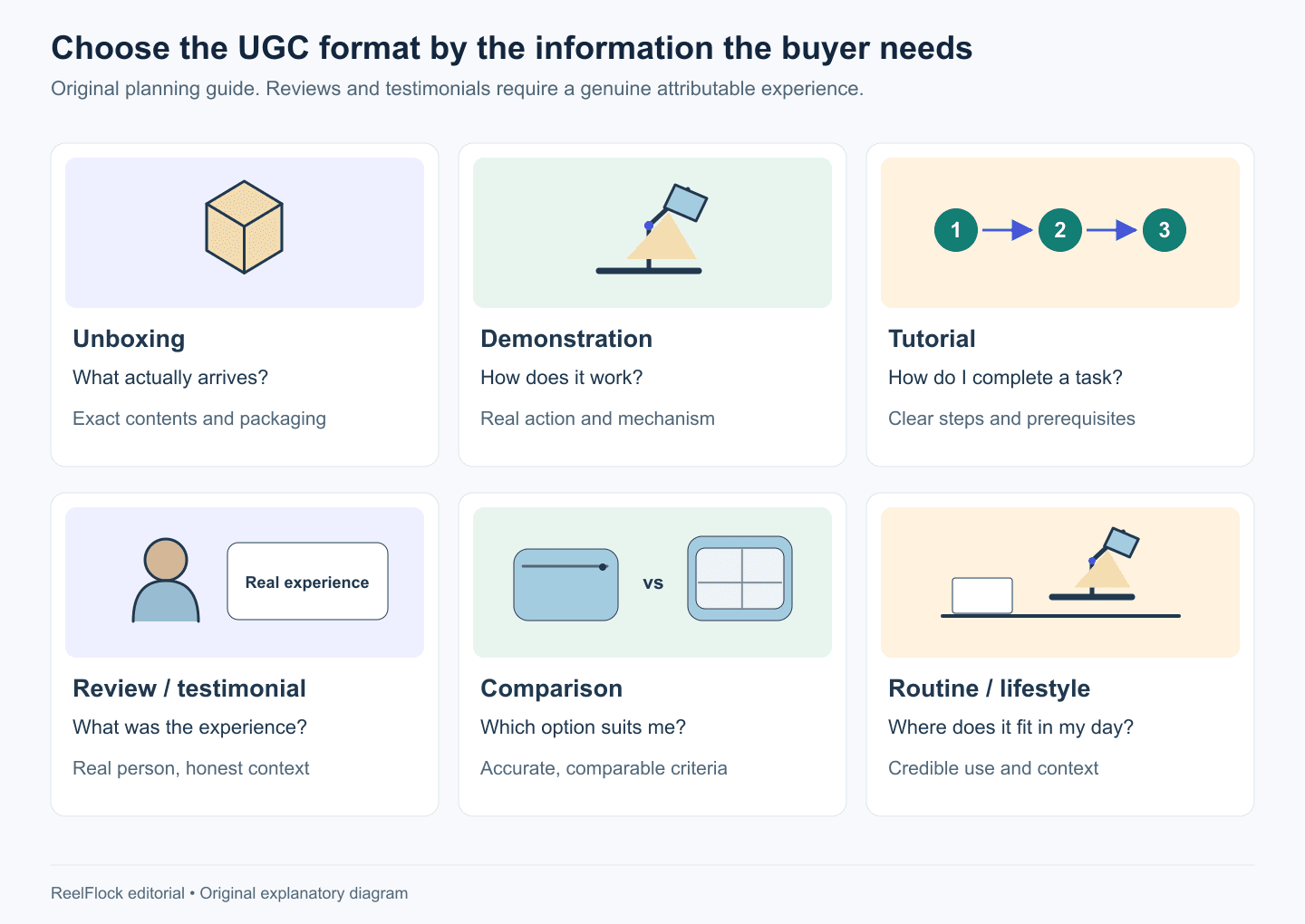
Choose the format that supplies the missing information. Reviews and testimonials require a real attributable experience; a presentation style cannot create that source.
Work through one product decision
Imagine a fictional ecommerce seller launching a modular drawer organizer. Shoppers need to understand the layout, measure their drawer and choose a suitable configuration.
A three-video plan could be:
| Video | Buyer question | Required material | Suggested next action |
|---|---|---|---|
| Layout demonstration | How do the pieces arrange? | Real pieces assembled in several supported arrangements | Inspect the included pieces |
| Measuring tutorial | Will this fit my drawer? | Verified measurements and an actual drawer measurement | Measure internal space before choosing |
| Genuine customer experience | How did someone use it? | A real customer's account and permitted footage | Consider whether that use matches your own |
The third video may take longer because it needs a real participant. The first two can progress while that experience is being arranged. This creates a realistic production sequence without turning a scripted presenter into an invented customer.
Copy this first-assignment brief
Product and exact configuration:
Intended buyer and situation:
One question this video must answer:
Source: customer / paid creator / seller / AI-assisted:
Approved facts and supporting material:
Required action or detail to show:
Claims and implications to avoid:
Suggested opening:
CTA and destination:
Intended channels and placements:
Deliverables, duration range and aspect ratios:
Music, footage, likeness and usage rights:
Commercial and AI disclosures where applicable:
Sample, feedback and final delivery dates:
Revision scope and approver:
Pass conditions for the finished video:
For the organizer's measuring tutorial, the pass condition might be: “Shows internal width and depth being measured, uses the correct units, and asks buyers to compare those measurements with the listed configuration.” A reviewer can evaluate that condition directly.
Send references with a reason. “Use this overhead framing so the measurement is visible” gives the maker more direction than “make it like this viral video.” Do not assume a reference's music or footage is licensed for your campaign.
Agree on rights and cost before production
Ask for a quote against the full scope. A fee for creating one file may not include paid advertising, extended usage, raw footage, extra aspect ratios or posting on the creator's account.
Use a commercial checklist when discussing the assignment:
- Which final and source files will be delivered?
- Who may publish the content, and on which channels?
- Are organic use, paid use and account-based ad authorization included?
- What territories and usage term have been agreed?
- May the brand crop, subtitle, translate or combine the material?
- Which revisions are included, and what counts as a new assignment?
- How are music, likeness and third-party footage permissions handled?
These are negotiation points to document with the relevant parties. A hashtag, tag or downloadable file alone does not establish the intended usage agreement.
Avoid relying on a universal “cost per UGC video.” Product complexity, production needs, licensing and deliverables change the quote. Compare offers using the same scope so the difference in price is meaningful.
Review the content before adapting it across channels
Watch once as a shopper and once as the product owner. The first pass asks whether the video answers the question. The second checks the exact configuration, demonstration, wording and destination.
For an experience-led video, inspect whether edits change the source's meaning. For a product tutorial, follow the steps against the actual instructions. For generated creative, inspect product geometry, labels and any action that could imply performance evidence.
Then adapt for each placement. A product-page video may need a clean explanation and fewer platform cues. A social placement needs readable framing under its interface. A paid placement needs the appropriate technical specifications and permissions. Confirm commercial disclosures remain visible after cropping or shortening.
For US video endorsements, the FTC advises placing disclosure in the video itself. A buried description can be missed. FTC: Disclosures 101.
Build a small library with useful labels
Record the product, buyer question, source, permissions, revision and intended placements alongside each file. Add the rights expiration or review date when applicable.
This lets a future campaign reuse an accurate demonstration while commissioning a new opening or updated offer. It also makes it easier to withdraw material when a product changes or a usage term ends.
Review results against the video's job. A tutorial that reduces repeated fit questions and an acquisition ad aimed at product clicks serve different purposes. Choose the available measures that match the assignment, and record the limits of comparisons across channels.
Use ReelFlock for suitable product-video variations
Once the source and format decisions are clear, you can separate the work that needs real participation from the work that can use verified product facts. Keep genuine reviews and demonstrations as their appropriate source material.
ReelFlock can help develop scripts and batch product videos for the explanation and ad-creative portion of that plan, with account assignments and review before publishing. You can also upload completed creator footage and assign a publishing account when the file and rights are ready.
Explore ReelFlock's product-video workflow using the completed brief for one buyer question. Keep the same acceptance checks for every variation.