
Video automation uses repeatable instructions to create or process videos with less manual work for each output. It can mean replacing text in a fixed template, rendering a timeline through an API, clipping long footage, or generating product-video variations from a script and product inputs.
An ecommerce seller should choose the method according to what must stay accurate. A price-card animation needs dependable text replacement. A product demonstration needs the product's shape and behavior to remain credible. A batch for several accounts also needs a clear assignment and review process.
Choose the kind of video automation your job needs
| Your production job | Approach to consider | Main preparation | Main review risk |
|---|---|---|---|
| Reuse a stable layout across many SKUs | Data-driven templates | Consistent product fields and suitable assets | Wrong text, crops or variants |
| Generate videos inside another application | Rendering API | Timeline logic, data mapping and engineering support | Integration failures and bad mappings |
| Turn existing recordings into shorter clips | Editing or repurposing automation | Source footage and selection criteria | Lost context or misleading edits |
| Develop product ads with varied scripts and scenes | AI-assisted product-video production | Product facts, references and creative direction | Visual drift and unsupported claims |
These methods can overlap. Shotstack's own software overview covers template, no-code and API approaches, illustrating why a single tool category cannot describe every automation job. Shotstack: Video automation software.
Choose one production problem for the first batch. You can combine methods later when the benefit justifies the handoff.
Separate fixed facts from creative choices
For each product, decide which elements are fixed and which may vary.
Fixed elements can include product identity, pack quantity, material, dimensions, available colors and substantiated claims. Creative choices can include the opening question, situation, explanation order and CTA wording.
This distinction makes review faster. The reviewer can reject an invented attachment immediately while still allowing several ways to introduce the same product.
Consider a fictional adjustable desk lamp. The verified facts are a hinged arm, a defined set of brightness settings and a particular power connection. The creative team may vary the buyer situation between reading, a small desk and an evening workspace. It should avoid inventing cordless operation or an unverified eye-health benefit.
Create a short reference sheet with the actual product images, allowed statements, evidence and exclusions. Keep a variant-specific image where similar models use different controls.
Build a batch matrix that reflects actual demand
A batch matrix tells you what each output is for. Use one row per planned video:
| Field | Example for the fictional lamp |
|---|---|
| Product | Lamp A, black, specified power connection |
| Buyer situation | Small desk with limited surface space |
| Opening | “Need room for your notebook and a light?” |
| Main explanation | Show placement and arm adjustment |
| Required evidence | Actual dimensions and real adjustment reference |
| CTA | Check dimensions and available colors |
| Assigned account | Authorized brand demonstration account |
| Version | Space-angle / opening-01 / revision-01 |
Suppose you have 4 products × 3 angles × 2 openings = 24 outputs. If three accounts will use the batch, twenty-four remains the total until you explicitly commission account-specific versions. Writing “24 per account” would increase the target to seventy-two.
Confirm that each angle applies to each product. A blanket matrix can create invalid combinations, such as a portability script for a lamp that requires a permanent power connection.
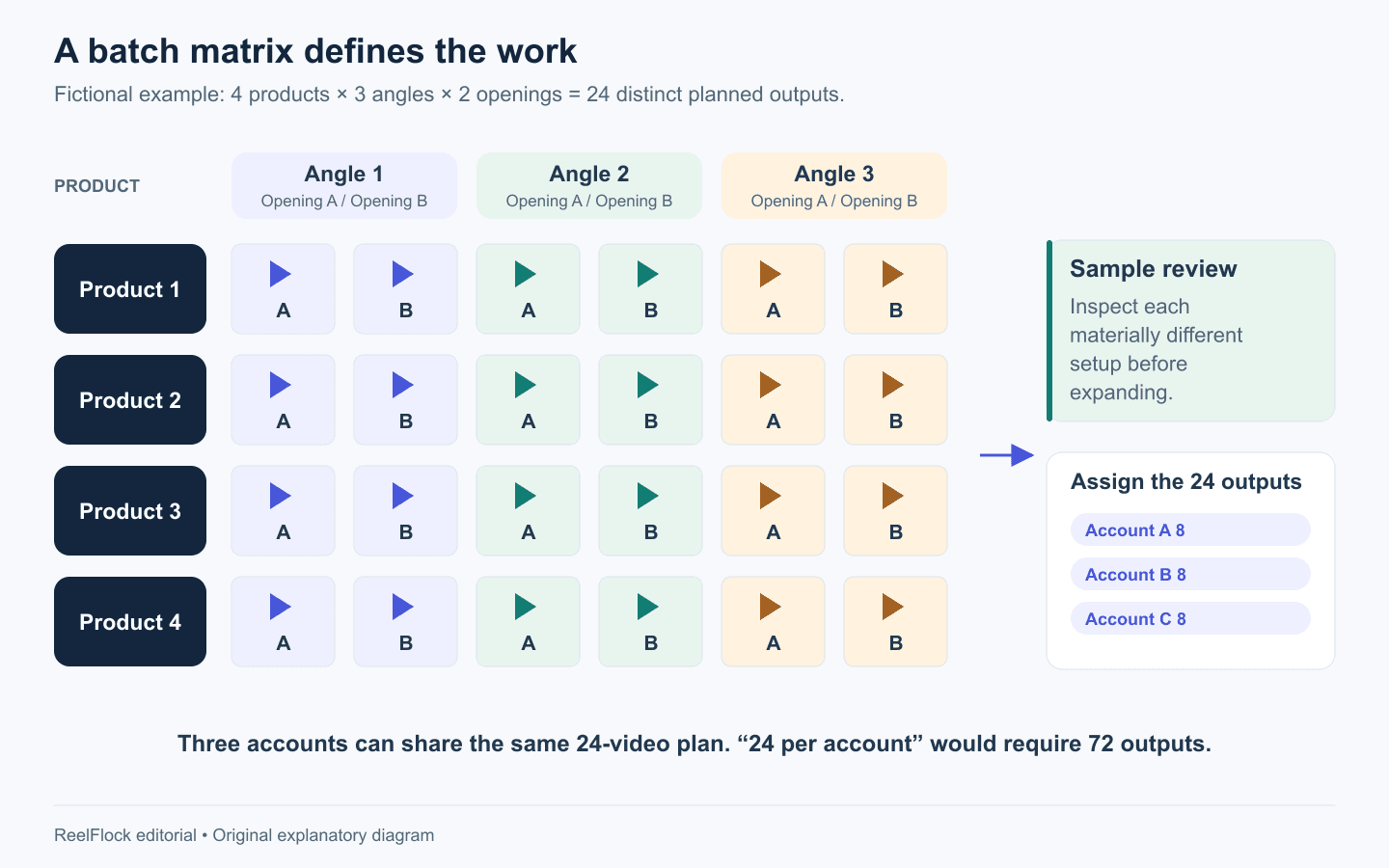
The matrix contains 24 outputs. Assigning them across three accounts can preserve that total; separate account-specific versions require an explicit increase. Fictional example.
Validate inputs before generating the batch
Do a practical input check:
- Open every product reference and confirm the identifier and variant.
- Inspect image resolution, cropping and visible branding.
- Check whether the script requires footage or proof you actually have.
- Read all numbers aloud with their units.
- Remove expired offers and unsupported superlatives.
- Confirm where each account fits in the campaign.
A source can be technically valid and still be unsuitable. A tiny image might upload successfully while failing to show the product's controls. A product page can load while defaulting to a different variant. Fix these issues at intake.
Use a sample gate for each materially different setup
Generate representative samples before completing all twenty-four outputs. A new product, substantially different scene or different type of claim deserves inspection. Sampling only the easiest product tells you little about the harder ones.
Review the complete video at normal speed, then inspect important details frame by frame. Ask:
- Can the viewer identify the actual product?
- Are dimensions, labels and controls represented correctly?
- Does the action match the real mechanism?
- Do the words promise more than the footage or evidence supports?
- Can the buyer read the necessary text on a phone?
- Does the CTA lead to the correct next step?
For the lamp, an attractive scene can still fail if the arm bends through an impossible joint. Use real footage for a performance demonstration when an accurate action is essential. A generated scene can explain a setting without serving as proof that the product performs a particular test.
Change one meaningful variable at a time
Variations become useful when you know what changed. Begin by holding the product facts, core explanation and destination constant while testing different openings. Then vary the angle or demonstration in a separate group.
A fictional pair might open with either “Desk too crowded?” or “Where would you put your reading light?” Both lead into the same space-use explanation. If the next pair changes the setting, product, offer and voice simultaneously, a difference in results has several possible causes.
Creative testing in a real account still has audience and timing differences. Treat comparisons as evidence for the next production decision, with those limitations in mind.
Keep errors attached to the stage that caused them
| Failure | Likely next action | Scope of recheck |
|---|---|---|
| Wrong variant in every output | Correct the source product record | Entire affected product group |
| One malformed generated scene | Revise or replace the scene | That output and close variations |
| Text is clipped in one layout | Correct layout or shorten text | Outputs sharing the layout |
| Unsupported statement in several scripts | Correct the approved wording | All scripts derived from it |
| Publishing authorization fails | Resolve account access | Jobs assigned to that account |
Keep the last reviewed version when revising. Record why a file changed and which outputs depend on the same source. That is more useful than a folder filled with “final,” “final2” and “final-new” exports.
Count the work required to repair rejected outputs when evaluating automation. Rendering volume alone can hide a batch that consumes too much review time.
Make the release package easy to inspect
Each approved output should travel with its product identifier, script or concept version, account assignment, final description, destination and approval record. You can maintain this in a planning sheet if your production tool does not hold every field.
Keep text and offer information consistent across the video and post description. A correct file paired with an outdated description is still a release error.
After publishing, add the actual post reference and outcome to your record. Review the buying questions, product clicks or other available campaign metrics over comparable windows. A technically clean video is the beginning of evaluation; customer response determines what you should make next.
Create product-video batches with ReelFlock
For sellers whose recurring job is product-video creation, ReelFlock connects product inputs and scripts to batch production and account assignments. Use your matrix to define distinct angles, review representative outputs, and approve the finished batch before publishing.
You can also bring your own finished video into ReelFlock and assign a publishing account when the footage already answers the buying question. That preserves useful existing creative while giving it a place in the release workflow.
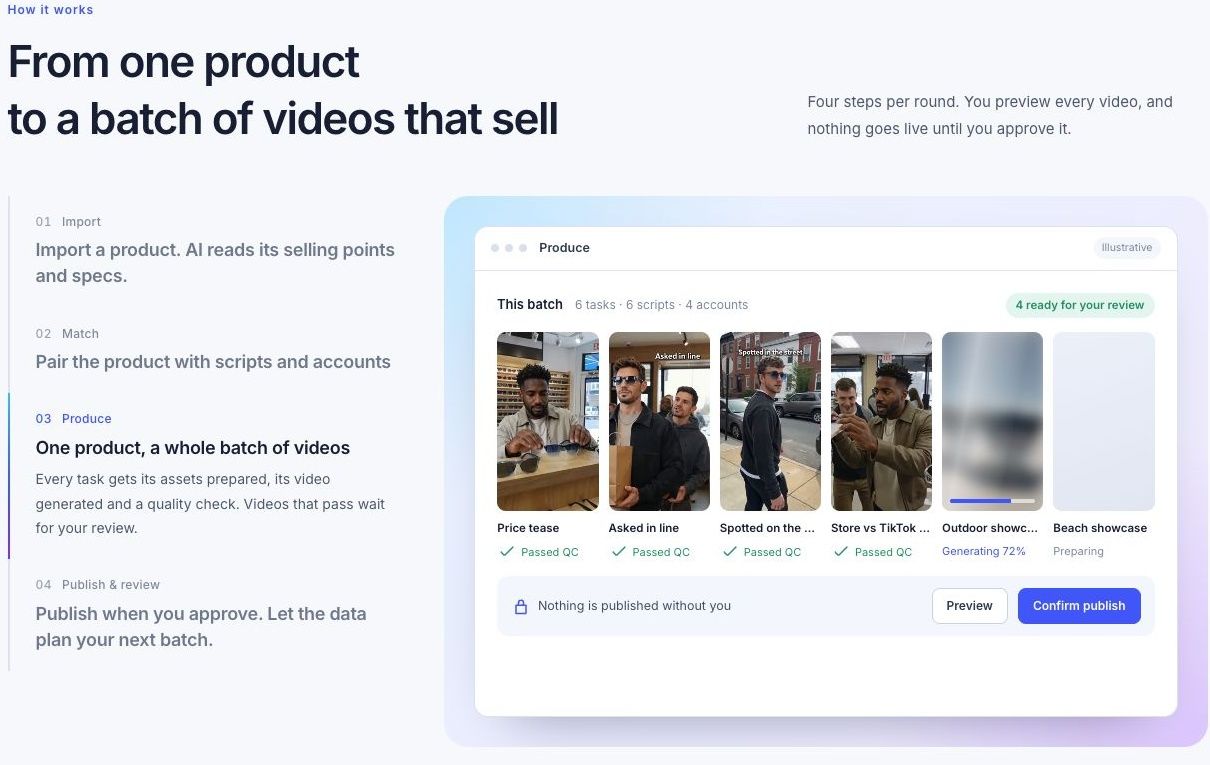
The public Produce walkthrough shows a batch waiting for review. Website screenshot captured November 3, 2026; the site labels the batch illustrative.
Create a product-video batch in ReelFlock using one product, three angles and a sample review before expanding.